
Overview:
Allovue offers three distinct modules: Allocate, Budget, and Manage, and they were previously stored in three different places.
-
Allovue Allocate helps finance leaders model funding scenarios. Districts create, adjust, and reevaluate complex budget allocations using formulas, rules, revenue and enrollment projections, and assumptions.
-
Allovue Budget helps administrators, finance teams, and school leaders plan their budgets. Users can plan future personnel expenses, non-personnel expenses, and supplemental pay expenses.
-
Allovue Manage allows your district to manage and monitor your current spending compared to your budget plan with ease. Users engage with dashboards featuring account and transaction data according to their role at the district and can review Purchase Order balances and track their spending across specific account sets.
With the introduction of Allovue Budget Suite (which combines all three modules), we integrate Allovue’s Navigation Panel to provide users a convenient way to navigate our software. Admins can now configure any part of Allovue from a single configuration area. When you navigate to a budget using the prominent Budget Search, you access the current spending dashboards for that budget and its future budget plans when available.
Wins:
Some great benefits come from our incorporating Allovue’s three modules into one budgeting suite.
-
Now, when you’re doing your budget planning, we’re able to give you a historical comparison of actuals to planned expenses and positions. This means you can understand where funds were planned last year but not this year, easily identify trends of spending in an account year over year, and tell you how your future budgeted positions compare to a specific point in time for your current staff roster.
-
Now, if your district has configured the current staff roster, you’ll be able to start your budgeting scenario from a copy of your staff as they are today, without a cumbersome process to update from what was planned last year to the current roster, and with our nightly sync you can have any updates to jobs and employees also update overnight from your ERP!
-
Now, after you use Allocate to define your plan for allocating dollars to your schools or departments for budgeting you don’t have to export and then import that plan into Budget to get started. Instead, your allocation plan automatically flows down to your budgeting Principals and Department Heads once you adopt the Allocate Scenario. You’re able to configure details like which segment codes are allowed and who can edit once, making year-over-year setup a breeze.
-
Now, you’ll have just one place to configure users and their Allovue access! So when you set up your budgets and roles and users in Allovue Budget Suite, that access and permission level persists everywhere in our app. This means that you can define that someone is a Principal at a School in a single place, and Allovue will understand which applications that user should have access to, which budgets they should be able to access, and provide their interface for both budgeting next Fiscal Year and spending dashboards for the current Fiscal Year.
-
Now, Allovue can offer a tool for creating your district’s Budget Book that includes information about prior year actuals, current year spend so far, and future budget plans in easy-to-understand tables inside a clean and modern design. We’ll even host it for you, so all you have to do is share the link, saving your team hours and hours each year!
Impact on you:
-
Your school or district will still have access to the same tools that they previously had access to.
-
You will have no disruption in your services or access to Allovue.
-
Our menu path will look slightly different. Use the chart below to understand the changes.
Landing Pages by Role Type:
When you first log in to Allovue, you can expect users to land on the following pages by default:
|
District Application Access |
User Type |
Default Landing Page |
|---|---|---|
|
Manage Only |
Admin |
All Budgets > Current FY > All Accounts |
|
Manage Only |
Single Budget User |
Single Budget > Current FY > Overview (formerly Buckets) |
|
Allocate Only |
Admin |
All Budgets > Future FY > Allocations > Overview |
|
Budget Suite |
Admin |
All Budgets > Current FY > All Accounts |
|
Budget Suite |
Single Budget User |
Single Budget > Current FY > Overview (formerly Buckets) |
Old Navigation
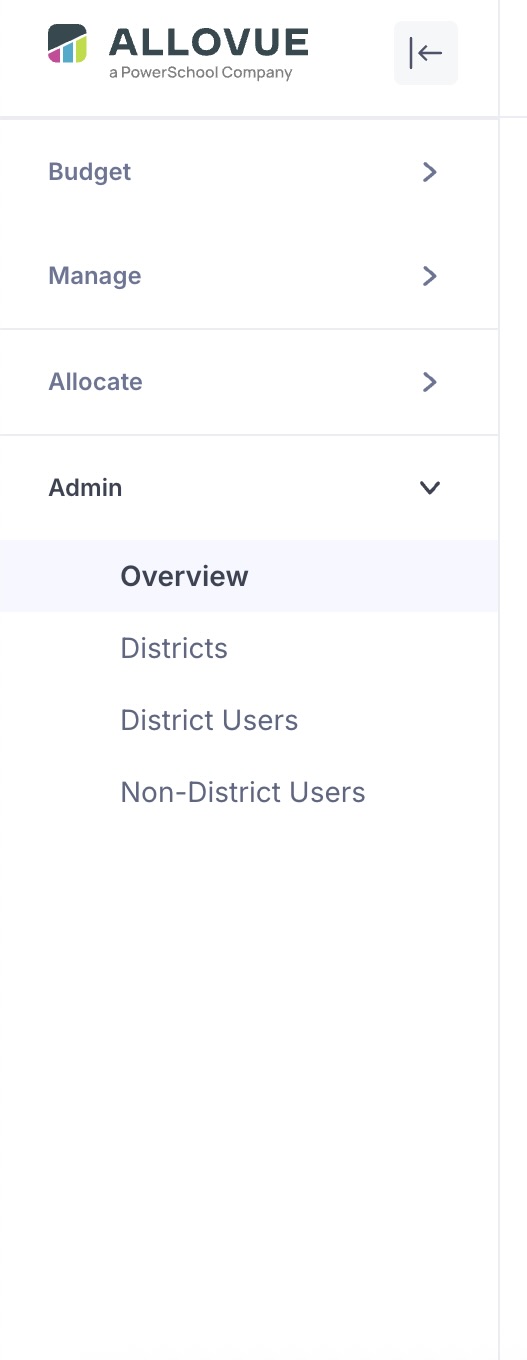
Application Administrator (Budget Suite Access)
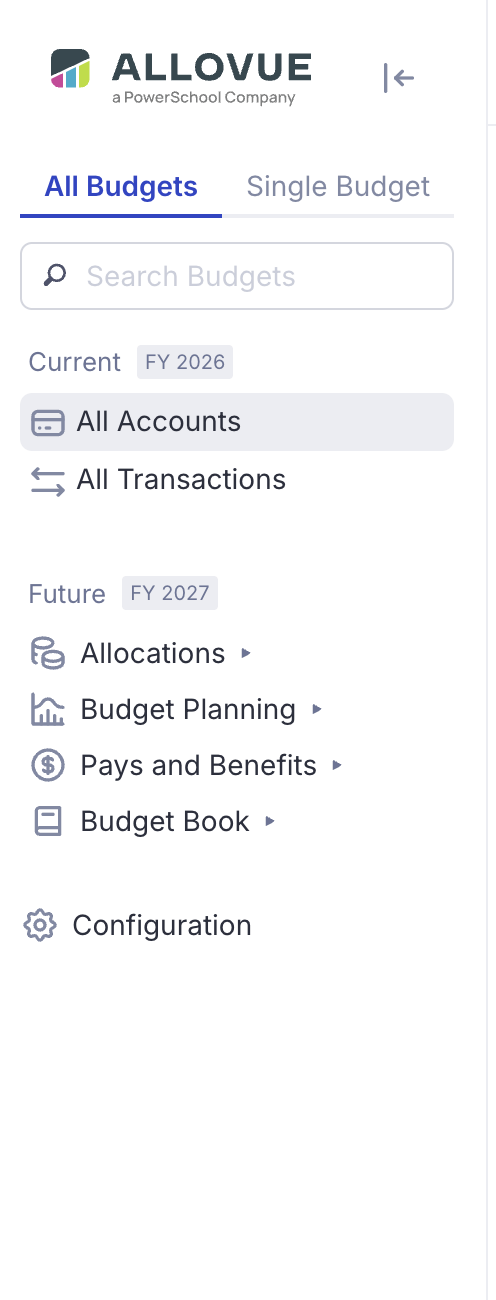
New Navigation Hierarchy Details:
|
New Page Name |
Menu Hierarchy Location |
Old Page Name If applicable |
Details |
Available to |
|---|---|---|---|---|
|
Current Fiscal Year* |
Allovue.app → Current |
Header Section |
The current header section will contain elements of Manage. |
Manager users (must have Manage access to see) |
|
Allovue.app-> Current-> Overview |
Buckets |
Previously this section was named “Buckets” in Manage. Buckets will be renamed to “Overview” and now be found from the “Current” header. Review Current Dashboard |
Manage users in the Single Budget menu |
|
Allovue.app-> Current-> All Transactions |
No Change |
Review Allovue Transactions Page |
Manage Admin users in the All Budgets menu |
|
Allovue.app-> Current-> All Accounts |
No Change |
Review Allovue Accounts Page |
Manage Admin users in the All Budgets menu |
|
Future Fiscal Year* |
Allovue.app → Future Fiscal Year |
Header Section |
|
Budget or Allocate Users |
|
Allocations** |
Allovue.app → Future Fiscal Year-> Allocations |
Header Section |
This current header section will contain elements of Allocate. |
Allocate Users Only |
|
Allovue.app → Future Fiscal Year-> Allocations-> Overview |
Dashboard |
Previously this section was named Dashboard. It will be renamed Overview and found from the Future section.
Review Allocate Dashboard |
Allocate Users Only |
|
Allovue.app → Future Fiscal Year-> Allocations-> Scenarios |
All Scenarios |
Previously this section was named All Scenarios. It will be renamed Scenarios and found from the Future Section |
Allocate Users Only |
|
Allovue.app → Future Fiscal Year-> Allocations-> Formulas |
No Change |
Review Formulas |
Allocate Users Only |
|
Allovue.app → Future Fiscal Year-> Allocations-> Enrollment Projections |
No Change |
Review Enrollment Projections |
Allocate Users Only |
|
Allovue.app → Future Fiscal Year-> Allocations-> Revenue Projections |
No Change |
Review Revenue Projections |
Allocate Users Only |
|
Allovue.app → Future Fiscal Year-> Allocations-> Job Cost Projections |
Job Types |
Previously this section was named Job Types. It will be renamed to Job Cost Projections. Review Job Types |
Allocate Users Only |
|
Allovue.app → Future Fiscal Year-> Allocations-> Assumption Sets |
No Change |
Review Assumptions |
Allocate Users Only |
|
Budget Planning** |
Allovue.app → Future Fiscal Year-> Budget Planning |
Header Section |
This current header section will contain elements of Budget. |
Budget Users Only (must have budget access to see) |
|
Allovue.app → Future Fiscal Year-> Budget Planning-> Overview |
No Change |
Review Planned - Overview Page |
Budget Admins for All Budgets, Budget Users for Single Budget |
|
Allovue.app → Future Fiscal Year-> Budget Planning-> Budget Proposals |
No Change |
Review Submit Proposals |
Budget Admins for All Budgets, Budget Users for Single Budget |
|
Allovue.app → Future Fiscal Year-> Budget Planning-> Personnel Expenses |
No Change |
Review Planned Personnel Expenses |
Budget Admins for All Budgets, Budget Users for Single Budget |
|
Allovue.app → Future Fiscal Year-> Budget Planning-> Non-Personnel Expenses |
No Change |
Budget Admins for All Budgets, Budget Users for Single Budget |
|
|
Allovue.app → Future Fiscal Year-> Budget Planning-> Supplemental Expenses |
New |
|
Budget Admins for All Budgets, Budget Users for Single Budget |
|
Allovue.app → Future Fiscal Year-> Budget Planning-> Reporting |
No Change |
Review Reporting |
Budget Admins for All Budgets, Budget Users for Single Budget |
|
Allovue.app → Future Fiscal Year-> Budget Planning-> Approval Workflows |
No Change |
Review Approval Workflows Page |
Budget Admins for All Budgets |
|
Budgeted Pays and Benefits** |
Allovue.app → Future Fiscal Year-> Budgeted Pays and Benefits |
Header Section |
|
Budget Admins for All Budgets |
|
Allovue.app → Future Fiscal Year-> Budgeted Pays and Benefits → Scenario Staffing Import |
No Change |
Budget Admins for All Budgets |
|
|
Allovue.app → Future Fiscal Year-> Budgeted Pays and Benefits → Employee Pays |
No Change |
Budget Admins for All Budgets |
|
|
Allovue.app → Future Fiscal Year-> Budgeted Pays and Benefits → Employee Benefits |
No Change |
Budget Admins for All Budgets |
|
|
Allovue.app → Future Fiscal Year-> Budgeted Pays and Benefits → Supplemental Pays |
New |
|
Budget Admins for All Budgets |
|
Allovue.app → Future Fiscal Year-> Budgeted Pays and Benefits → Vacancy Job Pays |
Vacancy pays |
Review Vacant Job Pays |
Budget Admins for All Budgets |
|
Allovue.app → Future Fiscal Year-> Budgeted Pays and Benefits → Benefits Packages |
Coming Soon |
|
Budget Admins for All Budgets |
|
Budget Book** |
Allovue.app → Budget Book |
Header Section |
Review Budget Book |
Budget Admins for All Budgets |
|
Allovue.app → Budget Book → Settings |
No Change |
Review Budget Book |
Budget Admins for All Budgets |
|
Allovue.app → Budget Book → Builder |
No Change |
Review Budget Book |
Budget Admins for All Budgets |
|
Allovue.app → Budget Book → Publish |
No Change |
Review Budget Book |
Budget Admins for All Budgets |
|
Configuration* |
Allovue.app → Configuration-> |
Header Section |
|
Users who are Admins of either Allocate, Manage, or Budget |
|
Access Settings** |
Allovue.app → Configuration-> Access Settings |
Header Section |
|
Allocate, Budget, Manage Admins |
|
Allovue.app → Configuration-> Access Settings-> Users |
Users |
Review Users |
Allocate, Budget, Manage Admins |
|
Allovue.app → Configuration-> Access Settings-> Roles |
Roles |
Review Roles |
Allocate, Budget, Manage Admins |
|
District Structure** |
Allovue.app → Configuration-> District Structure |
Header Section |
|
Allocate, Budget, Manage Admins |
|
Allovue.app → Configuration-> District Structure → Organizations |
Organizations |
Review Organizations |
Allocate, Budget, Manage Admins |
|
Allovue.app → Configuration-> District Structure → Budgets |
Budgets |
Review Budgets |
Allocate, Budget, Manage Admins |
|
Allovue.app → Configuration-> District Structure → Priorities |
Priorities |
Review Priorities |
Budget, Manage Admins |
|
Allovue.app → Configuration-> District Structure → Strategies |
Strategies |
Review Strategies |
Budget, Manage Admins |
|
Current** |
Allovue.app → Configuration → Current-> |
Header Section |
|
Manage Admins |
|
Allovue.app → Configuration → Current-> Dashboard Account Sets |
No changes |
Review Buckets |
Manage Admins |
|
Allovue.app → Configuration → Current-> Rollup Templates |
No changes |
Review Rollup Widget Template |
Manage Admins |
|
Allocate** |
Allovue.app → Configuration → Allocate-> |
Header Section |
|
Allocate Admins |
|
Allovue.app → Configuration → Allocate-> Allocations |
No changes |
Review Allocations |
Allocate Admins |
|
Allovue.app → Configuration → Allocate-> Organization Characteristics |
No changes |
Review Organization Characteristics |
Allocate Admins |
|
Allovue.app → Configuration → Allocate-> Sub-Enrollments |
No changes |
Review Sub-Enrollment Types |
Allocate Admins |
|
Allovue.app → Configuration → Allocate-> Historical Comparisons |
Historical Data |
ReviewHistorical Data |
Allocate Admins |
|
Allovue.app → Configuration → Allocate-> Assumption Definitions |
No changes |
Review Assumptions |
Allocate Admins |
|
Pay** |
Allovue.app → Configuration → Pay |
Header Section |
|
Manage, Budget Admins |
|
Allovue.app → Configuration → Pay → Employee Pay Rates |
Salaries |
Name changed to Employee Salaries to clarify that this is where you upload Actual Employee pays |
Manage, Budget Admins |
|
Allovue.app → Configuration → Pay → Vacant Job Pays |
Vacant Job Pays |
Review Vacant Job Pays |
Manage, Budget Admins |
|
Allovue.app → Configuration → Pay → Supplemental Pays |
No changes |
New Page |
Manage, Budget Admins |
|
Allovue.app → Configuration → Pay → Employee Benefits |
Employee Benefits |
Review Employee Benefits |
Manage, Budget Admins |
|
Allovue.app → Configuration → Pay → Benefit Packages |
New Page |
New page where you can create a few benefits packages to repeatedly assign to your Jobs (for us to observe for average benefits or in the case of vacancy) |
Manage, Budget Admins |
|
Allovue.app → Configuration → Pay → Vacancy Benefits |
Vacancy Benefits |
|
Manage, Budget Admins |
|
Staffing** |
Allovue.app → Configuration → Staffing |
Header Section |
|
Manage, Budget Admins |
|
Allovue.app → Configuration → Staffing-> Employees |
No changes |
Review Employees |
Manage, Budget Admins |
|
Allovue.app → Configuration → Staffing-> Jobs |
No changes |
Review Jobs |
Manage, Budget Admins |
|
Allovue.app → Configuration → Staffing-> Positions |
No changes |
Review Positions |
Manage, Budget Admins |
|
Allovue.app → Configuration → Staffing-> Position Funding |
No changes |
Review Position Funding |
Manage, Budget Admins |
|
Allovue.app → Configuration → Staffing-> Assignments |
No changes |
Review Assignments |
Manage, Budget Admins |
|
Allovue.app → Configuration → Staffing-> Assignment Funding |
No changes |
Review Assignment Funding |
Manage, Budget Admins |
|
General Ledger Settings** |
Allovue.app → Configuration → General Ledger Settings |
Header Section |
No changes |
Manage, Budget Admins |
|
Allovue.app → Configuration → General Ledger Settings → Chart of Accounts |
No changes |
Review Chart of Accounts |
Manage, Budget Admins |
|
Allovue.app → Configuration → Account Types |
No changes |
Review Account Types |
Manage, Budget Admins |
|
Allovue.app → Configuration → Account Custom Attributes |
No changes |
Review Chart of Accounts |
Manage Admins |