
This page provides a comprehensive snapshot of your District or Budget’s financial planning and proposal activity for the selected Scenario. It’s designed to help you quickly understand budget allocations, monitor proposal statuses, and take action where needed.
Header Section

Budget Name
Displays the name of the budget (or All Budgets) that you're viewing.
Adopted Scenario
Displays the current planning scenario and fiscal year. Here, users can opt to change the Scenario to view budget planning information for prior or future years.
Action Buttons
-
View Proposals: Navigate to the full list of proposals.
-
Start a New Proposal: Begin drafting a new proposal directly from this page.
Budget Details

Shows users high-level Allocated, Planned, and Remaining dollars and FTEs for that district/budget.
Note From the District
Districtwide note, entered by admin, to inform or guide users on the budget plan for the upcoming fiscal year.
Quick Links
Access frequently used pages/reports.
Allocation Resources Breakdown
-
Total Dollars: Overall budget and per-student breakdown.
-
Per-Pupil Amount: District funding per student.
-
FTE Summary (school-based budgets only): Summary of FTEs per organization compared to the prior year.
-
Enrollment (school-based budgets only): Summary of student enrollment per organization compared to the prior year.
Proposals Awaiting Your Review
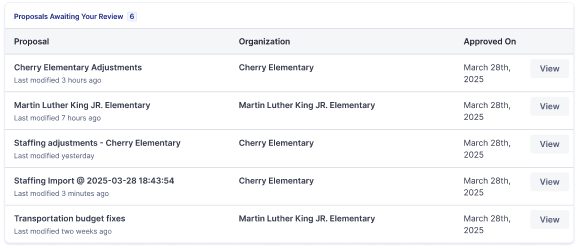
A widget showing proposals across Organizations that require the user’s review:
-
Proposal Name
-
last modified
-
-
Organization
-
Approval Date
Your Proposal(s)
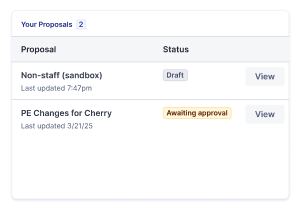
Track proposals you’ve authored:
-
Proposal Name
-
Status (e.g., Awaiting Approval)
Recently Approved Proposals
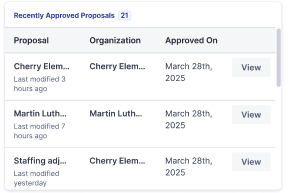
View proposals that have been approved for the selected district/organization:
-
Proposal Name
-
last modified
-
-
Organization
-
Approved On
Allocation Summary Table
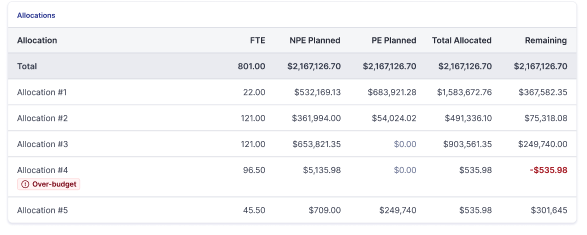
This widget provides a breakdown of how funds and staffing (FTEs) are distributed across different allocations. It helps users monitor planned spending and identify any overages or remaining funds.
Table Columns Explained:
-
Allocation: Identifier for each budget allocation.
-
FTE (Full-Time Equivalent): Number of staff planned
-
NPE Planned: Non-Personnel Expenditures planned (e.g., supplies, services).
-
PE Planned: Personnel Expenditures planned (e.g., salaries, benefits).
-
Total Allocated: Combined total of NPE and PE for the allocation.
-
Remaining: Funds left unallocated or overspent (negative values indicate over-budget).
Highlights:
-
Total Row: Summarizes all allocations combined.
-
Over-Budget Allocations: Clearly marked with negative remaining values to alert users.
-
Allocation Details: Each row shows how resources are distributed and whether adjustments may be needed.
Spending Priorities & Strategies Bar Chart
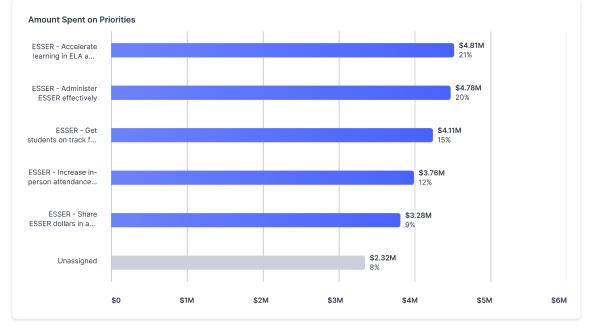
This chart visualizes how funds are being spent across key strategic priorities.
Purpose:
-
Helps users understand how funds are being prioritized.
-
Supports transparency and strategic planning.
-
Encourages alignment with district goals and compliance requirements.
-
Allows users to easily see how many planned dollars remain unassociated to priorities or strategies at the district.