
Administrators use the Import Data task in the Roster Workspace to bring student information into PowerSchool Enrollment using a configured data source.
A data source is a configuration that defines settings, rules, and mappings for ingesting student data into PowerSchool Enrollment, including:
-
What data to import
-
Which records to include
-
How source fields map to form fields
-
How imported values are transformed before being written
PowerSchool Enrollment supports two configuration models for bringing student data into workspaces and forms. Which model applies depends on the data source and how it is configured.
How Importing Works
The system uses the Data Source configuration to determine which students to import, which records to select, and how imported values are written to form fields.
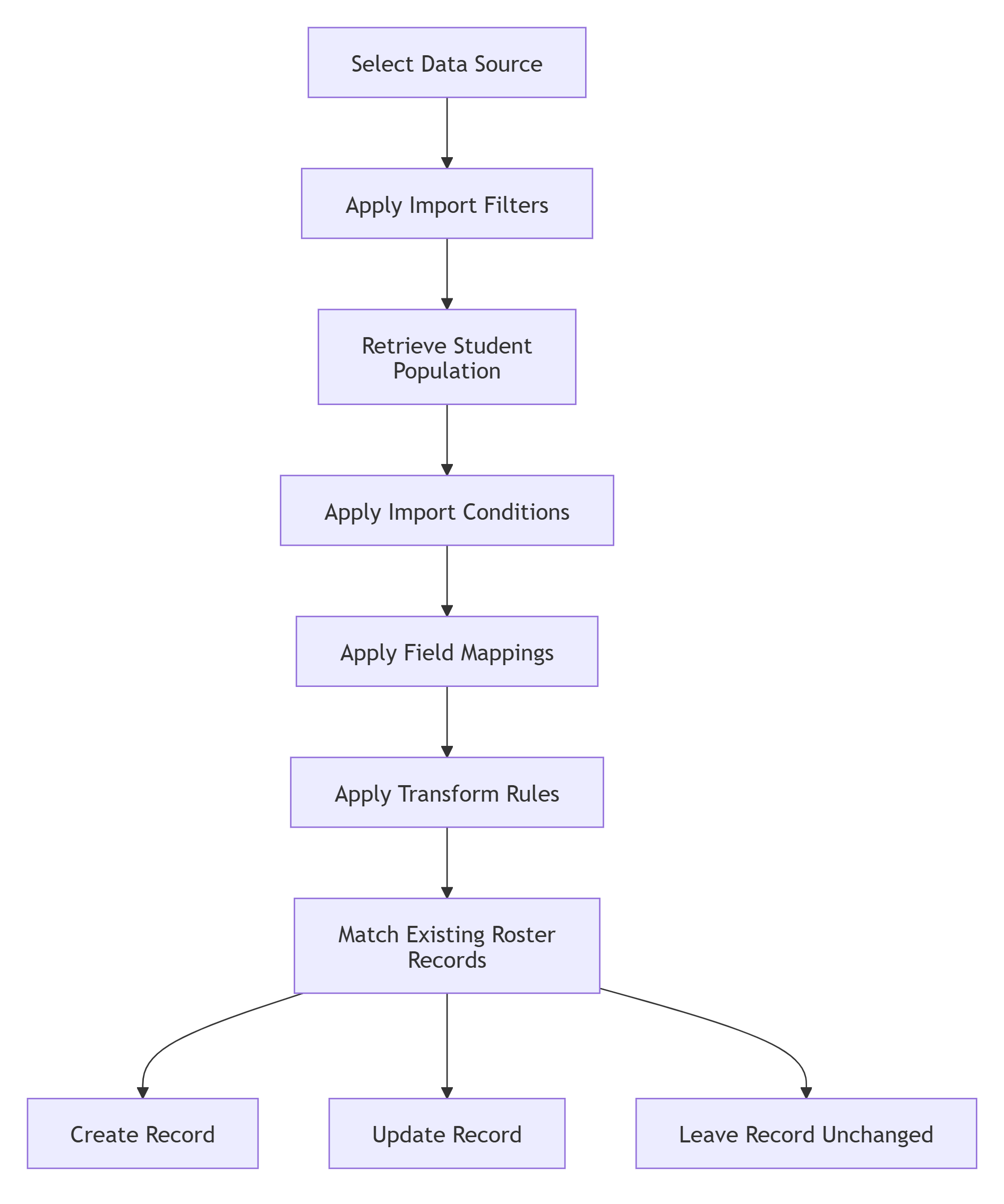
During import processing:
-
Import Filters determine which students are included.
-
Import Conditions determine which records are selected for those students.
-
Field Mappings identify which values are imported.
-
Transform Rules modify values before they are written.
-
The system matches incoming records using the configured primary key.
-
Records are created, updated, or left unchanged.
Import Types
Each Data Source has one Import Type, which determines how its data is used:
-
Roster: Imports data into the Roster Workspace, where administrators can review and manage the records. A form can have multiple Roster Data Sources.
-
Pre-Populate on Demand (PPD): Retrieves current source data when a parent opens a form and uses it to prefill fields. A form can have one PPD Data Source.
-
Year-Round Update (YRU): Retrieves current source data when a parent starts a Year-Round Update form. A form can have one YRU Data Source.
Note: Self-Service Data Sources do not support configuration for importing records directly into the Submission Workspace (refer toComplete Tasks | Create Records via Import. Submission Workspace imports continue to use legacy import configurations.
Source Types
The Source Type determines where imported information originates.
|
Source Type |
Supported Import Types |
|---|---|
|
PowerSchool SIS |
Roster, Pre-Populate on Demand, Year-Round Update |
|
eSchoolPlus |
Roster, Pre-Populate on Demand, Year-Round Update |
|
CSV |
Roster only |
PowerSchool SIS and eSchoolPlus require a SIS Connection. CSV imports data from a file and does not use a SIS Connection.
Who Can Set This Up?
Access Requirements
The Data Sources tab is available to a District Administrator when:
-
The user has the Configuration role.
-
Form Building is enabled for the customer.
Form Access Requirements
The availability of the Data Sources tab depends on the form type.
|
Form Type |
Supported Import Types |
|---|---|
|
Private |
Roster, Pre-Populate on Demand, Year-Round Update |
|
Restricted with Pre-Populate on Demand enabled |
Pre-Populate on Demand only |
|
Restricted with Pre-Populate on Demand disabled |
Not available |
|
Public |
Not available |
Key Terms
|
Term |
Description |
|---|---|
|
Import Type |
The setting that defines whether a Data Source is used for Roster, Pre-Populate on Demand, or Year-Round Update. |
|
Source Type |
The setting that identifies where imported data originates: PowerSchool SIS, eSchoolPlus, or CSV. |
|
Source Record |
The configuration for a single source entity type within a Data Source. |
|
Import Condition |
A rule that determines which records are selected for a student. |
|
Subrecord |
A child entity associated with a Source Record. |
|
Field Mapping |
A rule that maps a source property to a target form field. |
|
Transform Rule |
An optional processing step applied to a mapped value before it is written to the target field. |
|
Import Filter |
A source-level setting that determines which students are included in an import. |
|
Metadata Sync |
The process of retrieving and caching PowerSchool SIS schema information. |
|
Legacy Configuration |
An import configuration built using the legacy ODC pipeline. |
|
JIT Migration |
Just-in-time migration of a legacy configuration into a native Data Source. |
|
PPD |
Pre-Populate on Demand. |
|
YRU |
Year-Round Update. |