
School Info
1. School Name
-
Object Label:
school name,school name page2 -
PowerQuery / DAT:
~([39]Name) -
Screen: School
-
Description:
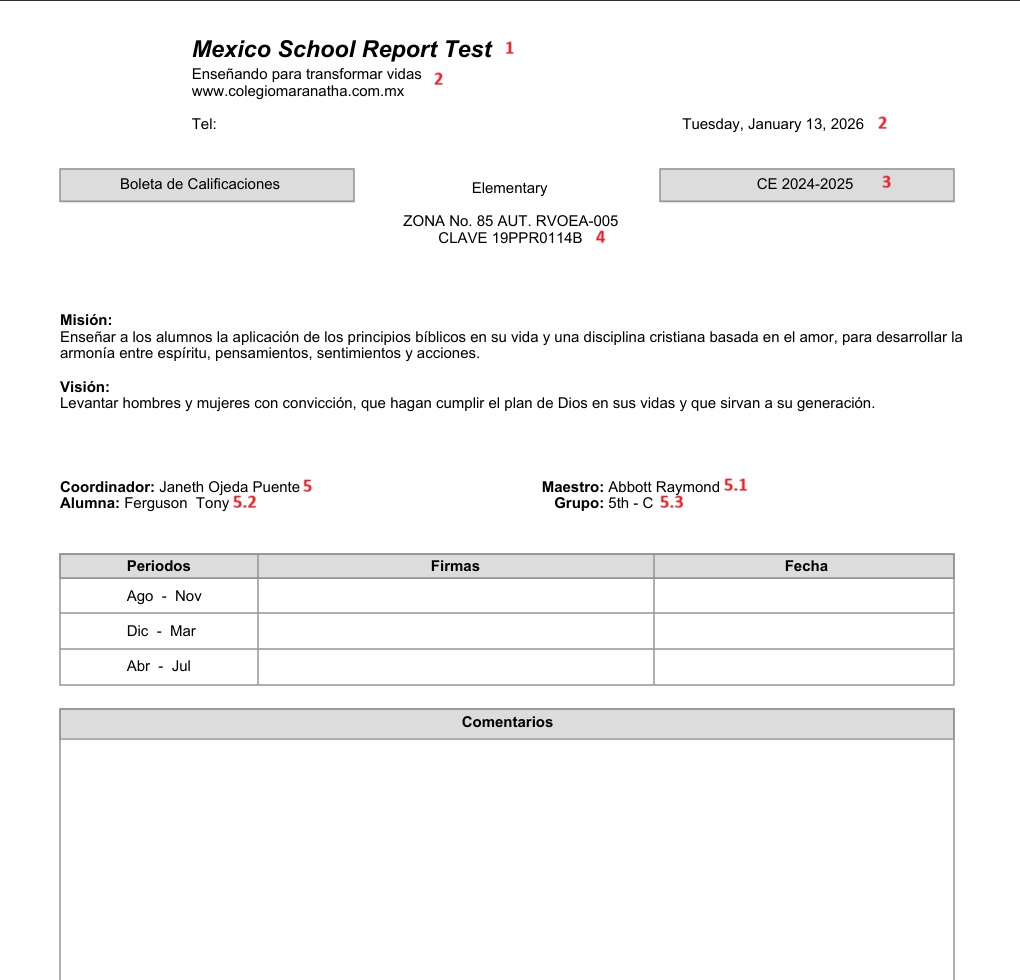
Displays the current school name from the School table. Used on both Page 1 and Page 2.
2. School Address / Details
-
Object Label:
school details,school details page2 -
New Object Label: School Address & Contact
-
PowerQuery / DAT:
-
Address:
~([39]address) -
Phone:
~([39]schoolphone) -
Date:
^[long.date]
-
-
Screen: School
-
Description:
Static Spanish header text plus school address and phone. Current long date is printed at the right side on the same line as the phone.Example text (Page 1 & 2):
Enseñando para transformar vidas
www.powerschool.com.mx
~([39]address)
Tel: ~([39]schoolphone)<tabr 7.2> ^[long.date]
3. Term / Year Label
-
Object Label:
term year -
PowerQuery / DAT:^(yearname)
-
Screen: Years & Terms
-
Description:
The academic year name from^(yearname).
4. School Code
-
Object Label:
Preschool(part of text) -
PowerQuery / DAT:
~([39]school_number),~([39]address) -
Screen: School
-
Description:
Printed under the “Preschool” heading, as part of a centered block:<center>Preschool</center> <center>~([39]address)</center> <center>CLAVE ~([39]school_number)</center>
~([39]school_number) Power Query DAT shows the school number,
~([39]address) Power Query DAT shows the full school address
5. Mission & Vision Block (Page 1)
-
Object Label:
Misión&Visión -
PowerQuery / DAT:
-
~[39]Principal: display the school principal's name,
-
~(*powerquery;query=com.powerschool.dat.reports.students.teacherinfo;fields=fullname): teacher full name based on student and teacher home room match
-
~(last_name) ~(Student) ~(first_name) ~(middle_name): display student full name
-
~(home_room): display student home room
-
-
Screens:
-
Student,staff – Teacher info
-
Demographics – Student name, Home Room
-
School:Principal Name
-
-
Description:
Static Spanish mission/vision text plus dynamic Coordinator (static name), Teacher (PowerQuery), Student full name and Group.<b>Misión:</b> Enseñar a los alumnos la aplicación de los principios bíblicos en su vida y una disciplina cristiana basada en el amor, para desarrollar la armonía entre espíritu, pensamientos, sentimientos y acciones. <b>Visión:</b> Levantar hombres y mujeres con convicción, que hagan cumplir el plan de Dios en sus vidas y que sirvan a su generación. <b>Coordinador:</b> ~[39]Principal<tabr 5><b>Maestro:</b> ~(*powerquery;query=com.powerschool.dat.reports.students.teacherinfo;fields=fullname) <b>Alumna:</b> ~(last_name) ~(*powerquery;query=com.powerschool.dat.reports.students.nameinfo;fields=thirdname) ~(first_name) ~(middle_name)<tabr 5><b>Grupo:</b> ~(home_room)
-
Student Number & Full Name
-
Object Label:
student number & name -
PowerQuery / DAT:
-
~(student_number):Display Student Number
-
~(last_name) ~(Student) ~(first_name) ~(middle_name): display student full name
-
-
Screens: Student Demographics
-
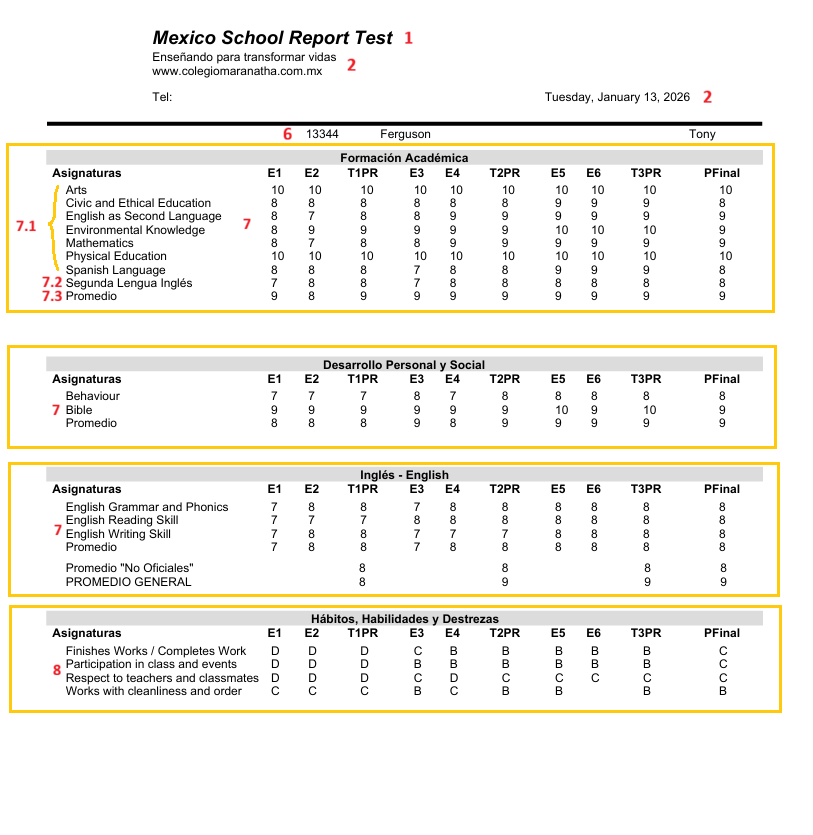
Description:it displays Student number and student full name
~(student_number)<tabr 4.5>~(last_name)<tabr 5.7> ~(*powerquery;query=com.powerschool.dat.reports.students.nameinfo;fields=thirdname)<tabr 7.5> ~(first_name) ~(middle_name)
-
Grades Table
-
Object Label:
Grades 1 -
PowerQuery /DAT:
-
^(*powerquery;query=com.powerschool.dat.reports.students.coursegrades.numeric;tableformat;fields=altcoursename,E1,E2,T1PR,E3,E4,T2PR,E5,E6,T3PR,PFinal;arg.course_group_cd_list=FOA26;arg.storecode=E1|E2|E3|E4|E5|E6;arg.resultset=0)
-
-
Screens: Historical Grades, Reporting Terms(Power Teacher Pro)
-
Description: The Power Query provides historical and current academic grade information based on the selected academic year and the given arguments to the powerquery. Refer to the https://powerschoolgroup.atlassian.net/wiki/spaces/IPRD/pages/67817504848/Mexico+PowerQuery+DAT+26.2.0.0#Sample-Report-Card-DATs and construct it as a table.
-
The grades can be displayed in three ways:
-
use arg.resultset = 0 to show all subjects' grades in the course group;
-
use arg.resultset = 1 to show all subjects' grades along with their average(Promedio);
-
use arg.resultset = 2 to show only the average grade of the course group.
-
For resultsets 1 and 2, the average row label must be passed via avg_label. Use this DAT for Numeric Grades.
-
-
Example:
-
7.1 displays grades for subjects in the course group Formación Académica with arg.resultset = 0.
-
7.2 displays the average of all English-related subjects, that is, the course group Inglés - English, using arg.resultset = 1 and passing arg.avg_label = Segunda Lengua Inglés to display in the first column instead of the subject. 7.3 Promedio is the average of both Formación Académica and Inglés - English with arg.resultset = 2 and avg_label = Promedio.
-
<table><tr><th width="154"></th><th width="28"></th><th width="39"></th><th width="40"></th><th width="27"></th><th width="39"></th><th width="40"></th><th width="27"></th><th width="39"></th><th width="57"></th><th width="30"></th>
</tr>^(*powerquery;query=com.powerschool.dat.reports.students.coursegrades.numeric;tableformat;fields=altcoursename,E1,E2,T1PR,E3,E4,T2PR,E5,E6,T3PR,PFinal;arg.course_group_cd_list=FOA26;arg.storecode=E1|E2|E3|E4|E5|E6;arg.resultset=0)^(*powerquery;query=com.powerschool.dat.reports.students.coursegrades.numeric;tableformat;fields=altcoursename,E1,E2,T1PR,E3,E4,T2PR,E5,E6,T3PR,PFinal;arg.course_group_cd_list=IEN26;arg.avg_label=Segunda Lengua Inglés;arg.storecode=E1|E2|E3|E4|E5|E6;arg.resultset=2)^(*powerquery;query=com.powerschool.dat.reports.students.coursegrades.numeric;tableformat;fields=altcoursename,E1,E2,T1PR,E3,E4,T2PR,E5,E6,T3PR,PFinal;arg.course_group_cd_list=FOA26,IEN26;arg.avg_label=Promedio;arg.storecode=E1|E2|E3|E4|E5|E6;arg.resultset=2)</table>
8.Grades Table
-
Object Label:
Grades 4 -
PowerQuery /DAT:
-
^(*powerquery;query=com.powerschool.dat.reports.students.reportcard.alpha;tableformat;fields=combinedcoursename,E1,E2,T1PR,E3,E4,T2PR,E5,E6,T3PR,PFinal;arg.storecode=E1|E2|E3|E4|E5|E6|T1|T2|T3|Y1;arg.course_group_cd_list=HHD26;arg.resultset=1)
-
-
Screens: Historical Grades, Reporting Terms(Power Teacher Pro)
-
Description: The Power Query provides historical and current academic grade information based on the given arguments. Refer to the Mexico Localization - Power Query DATs. and construct it as a table. Use this DAT for Alphabetic grades.
-
Example:
<table><tr><th width="154"></th><th width="28"></th><th width="39"></th><th width="40"></th><th width="27"></th><th width="39"></th><th width="40"></th><th width="27"></th><th width="39"></th><th width="57"></th><th width="30"></th></tr>^(*powerquery;query=com.powerschool.dat.reports.students.reportcard.alpha;tableformat;fields=combinedcoursename,E1,E2,T1PR,E3,E4,T2PR,E5,E6,T3PR,PFinal;arg.storecode=E1|E2|E3|E4|E5|E6|T1|T2|T3|Y1;arg.course_group_cd_list=HHD26;arg.resultset=1)</table>