Overview
PowerSchool is introducing a new centralized File Transfer Protocol (FTP) service that provides improved security, self-service management, and a standardized structure across multiple PowerSchool products.
Permission Click will begin using this new Central FTP service on Monday, March 9, 2026, which can be leveraged for the same use cases and in the same ways as the preexisting Permission Click FTP service, including receiving OneRoster data and delivering system‑generated reports.
The management of this new Central FTP service, including folder management, user management, etc. is done through Admin Center, PowerSchool’s new admin portal powered by MyPowerHub. Refer to the FTP administration documentation for more details.
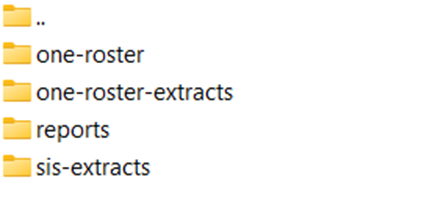
The Permission Click folder structure within the new Central FTP service is as follows:
Transition
If your organization uses the legacy Permission Click FTP service for imports and/or exports in Permission Click, your organization must transition to this new Central FTP service. The deadline for this transition is Friday, May 29, 2026.
To access your organization’s Admin Center and start configuring and using the new Central FTP service, your organization must submit a support case that includes the list of admin user email addresses that need permission to configure the FTP.
Failure to initiate and perform this transition by the deadline will result in loss of service/functionality dependent on FTP within Permission Click.
No file migration will be performed. The new Central FTP will not contain any files previously or currently on the legacy Permission Click FTP.
Transition Period
During the transition period:
-
Customers will temporarily see both the legacy Permission Click FTP and the new Central FTP. Once the transition period is over, only the new Central FTP will remain, while the legacy Permission Click FTP service will be deprecated.
-
Once your organization has transitioned to the new Central FTP, files will immediately begin being picked up from and sent to the new location.
-
Regardless of whether your organization has transitioned to the new Central FTP or not, files to be imported will continue to be picked up from the old location, and exported files will continue to be sent to the old location up until the transition deadline. Note that if your organization already completed the transition and you place files to be imported in both the old and new locations, those files will be processed twice.
If your organization has any processes (automated or manual) that place files or pick up files, the folder location and authentication used in those processes will need to be updated.
Deprecation of Legacy FTP Service
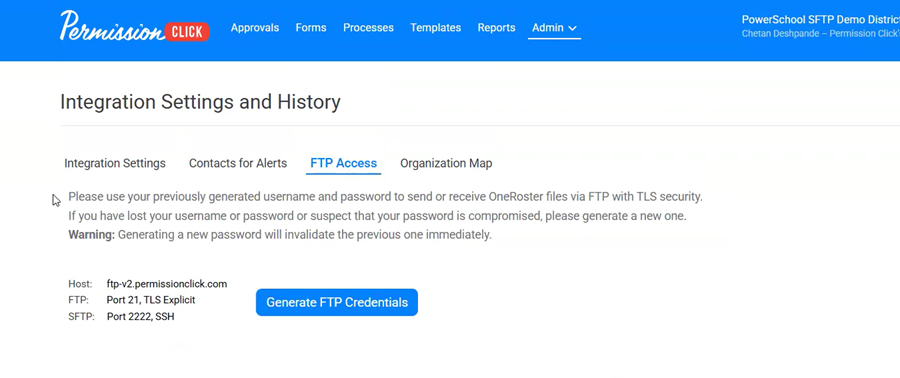
After the transition deadline, the legacy Permission Click FTP service will be deprecated. In doing so, the FTP Access tab within Admin > Integration Settings and History will be removed: