
Transcripts in Thai (Grade 1-6) & Transcripts in Thai (Grade 1-6):Re-Print
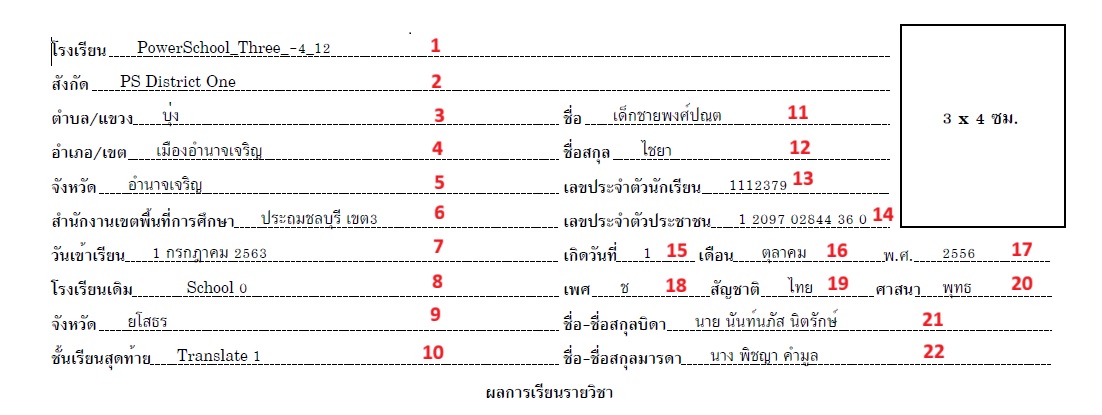
School Information
-
School Name (โรงเรียน)
-
Object Label: name val
-
New Object Label: school Name
-
PowerQuery: ~([39]Name)
-
Screen: School
-
Description:
This DAT is used to display the current school of the selected students.
-
-
District Office Name (สังกัด)
-
Object Label: line 2 val dist
-
New Object Label: District office name
-
PowerQuery: ~(*powerquery;query=com.powerschool.th.report.dat.pref;arg.preffield=districtname;fields=value)
-
Screen: School
-
Description: This PowerQuery DAT identifies the district office name. In this PowerQuery DAT, we use the argument arg.preffield = districtname. It retrieves the value from the name column in the pref table, so PowerQuery DAT returns the district name.
-
-
Subdistrict / Subdivision (ตำบล/แขวง)
-
Object Label: line3 val school subdist
-
New Object Label: school subdistrict
-
PowerQuery: ~(*powerquery;query=com.powerschool.th.admin.dat.schoolinfo;fields=school_subdistrict;arg.locale=US_th)
-
Screen: School
-
Description: This PowerQuery DAT returns the school subdistrict value. To get the correct translation, use the locale argument, e.g.: arg.locale=US_th. Provide the correct locale to get translations.
-
-
School District (ตำบล/แขวง)
-
Object Label: line 4 val dist
-
New Object Label: School District
-
Report Label:
-
PowerQuery: ~(*powerquery;query=com.powerschool.th.admin.dat.schoolinfo;fields=school_district;arg.locale=US_th)
-
Screen: School
-
Description: This PowerQuery DAT returns the school district value. To get the correct translation, use the locale argument, e.g.: arg.locale=US_th. Provide the correct locale to get translations.
-
-
School Province (จังหวัด)
-
Object Label: line 5 val prov
-
New Object Label: School Province
-
PowerQuery: ~(*powerquery;query=com.powerschool.th.admin.dat.schoolinfo;fields=school_provience;arg.locale=US_th)
-
Screen: School
-
Description: This PowerQuery DAT returns the school province value. To get the correct translation, use the locale argument, e.g.: arg.locale=US_th. Provide the correct locale to get translations.
-
-
school Alt district (สำนักงานเขตพื้นที่การศึกษา)
-
Object Label: line 6 val
-
New Object Label: School Alt District
-
PowerQuery: ~([schools.s_tha_schools_x]alt_schl_dist_name)
-
Screen: School
-
Description: This PowerQuery DAT returns the school alt district name.
-
-
School Day (วันเข้าเรียน)
-
Object Label: line7 val sch entry dt
-
New Object Label: School Entry Date
-
PowerQuery:
-
^(decode;^(SchoolEntryDate;dateformat=DD/MM/YYYY);00/00/0000;;~(powerquery;query=com.powerschool.th.report.dat.thaidateformat;fields=thaidate;arg.gregoriandate=^(SchoolEntryDate;dateformat=DD/MM/YYYY)))
-
-
Screen: Student enrollment history
-
Description:
-
The DAT returns the school entry date:
^(SchoolEntryDate;dateformat=DD/MM/YYYY). -
The report utilizes this DAT.
-
Using decode, checks for the existence of a date.
-
If a date exists, it passes the school entry date to the Gregorian date function to display it in Thai date format using powerquery:
~(powerquery;query=com.powerschool.th.report.dat.thaidateformat;fields=thaidate;arg.gregoriandate=^(SchoolEntryDate;dateformat=DD/MM/YYYY)).
-
-
-
Previous School (โรงเรียนเดิม)
-
Object Label: line 8 val prev school val
-
New Object Label: Previous School Name
-
PowerQuery: ~(*powerquery;query=com.powerschool.th.report.dat.formerschooldetails;fields=schoolname;arg.storecode=Y1)
-
Screen: Historical grades
-
Description: This PowerQuery DAT returns the student's previous school name using the argument store code (e.g., arg.storecode=Y1). It displays the previous school name if there is at least one previous school entry for the student in historic grades.
-
-
Previous School Province (จังหวัด)
-
Object Label: line 9 _val prev prov
-
New Object Label: Previous School Province
-
PowerQuery: ~(*powerquery;query=com.powerschool.th.report.dat.formerschooldetails;fields=schoolprovince;arg.storecode=Y1)
-
Screen: Historical grades
-
Description:
-
This PowerQuery DAT returns the student's previous school province using the argument store code (e.g., arg.storecode=Y1).
-
The argument arg.locale defaults to US_th; to use a different locale, specify it in arg.locale (e.g., arg.locale=TH_th).
-
It displays the previous school province if there is at least one previous school entry for the student in historical grades.
-
-
-
Previous Grade (ชั้นเรียนสุดท้าย)
-
Object Label: line 10 prev grade
-
New Object Label: Previous school Grade
-
PowerQuery: ~(*powerquery;query=com.powerschool.th.report.dat.formerschooldetails;fields=gradelevel;arg.storecode=Y1)
-
Screen: Historical grades
-
Description:
-
This PowerQuery DAT retrieves the student's previous school name using the store code argument (e.g., arg.storecode=Y1).
-
It displays the previous school grade level if the student has at least one previous school entry in historic grades.
-
The argument arg.locale defaults to US_th; to translate to another locale, specify it in the argument (e.g., arg.locale=TH_th).
-
-
Demographics
-
Student (ชื่อ)
-
Object Label: line 3_1 val prfix full name
-
New Object Label: Student Full Name
-
PowerQuery: ~(*powerquery;query=com.powerschool.th.dat.studentinfo;fields=thaiPrefix)^(First_Name)^(Middle_Name)
-
Screen: Demographics
-
Description:
-
Displays prefix using the DAT: ~(*powerquery;query=com.powerschool.th.dat.studentinfo;fields=thaiPrefix)
-
Default argument for locale is US_th.
-
For other locales, pass the desired locale in arg.locale (e.g., arg.locale=TH_th).
-
Use the specified PowerQuery if the default locale is Thailand.
-
If the default locale is English, use the PowerQuery: ~(*powerquery;query=com.powerschool.th.dat.studentinfo;fields=engPrefix).
-
-
-
Student Last Name (ชื่อสกุล)
-
Object Label: line 4_1 val last name
-
New Object Label: Student Last Name
-
PowerQuery: ^(Last_Name)
-
Screen: Demographics
-
Description: This PowerQuery DAT returns the selected student's last name.
-
Use it if the default locale is Thai.
-
If the alternate locale is Thai, use ^(StudentCoreFields.altlastname).
-
-
-
Student Number (เลขประจำตัวนักเรียน)
-
Object Label: line 5_1 value studentnumber
-
New Object Label: Student Number
-
Report Label:
-
PowerQuery: ^(Student_Number)
-
Screen: Demographics
-
Description: This PowerQuery DAT returns the selected student's student number.
-
-
National id (เลขประจำตัวประชาชน)
Object Label: line 6_1 val nid New Object Label: National id Report Label: National id (เลขประจำตัวประชาชน) PowerQuery: ~(*powerquery;query=com.powerschool.th.dat.studentinfo;fields=formatted_nationalid) Screen: Demographics Description: To display the national ID in the Thailand-specific format, use this PowerQuery DAT; otherwise, use ^(State_StudentNumber). -
DOB day (เกิดวันที่)
-
Object Label: line 7_1 val dob dt
-
New Object Label: DOB date
-
Report Label: DOB day (เกิดวันที่)
-
PowerQuery:
-
^(decode;^(DOB;dateformat=DD/MM/YYYY);00/00/0000; ;~(*powerquery;query=com.powerschool.th.report.dat.thaidateformat;fields=thaiday;arg.gregoriandate=^(DOB;dateformat=DD/MM/YYYY)))
-
-
Screen: Demographics
-
Description:
-
The DAT displays
^(DOB;dateformat=DD/MM/YYYY)to show the complete DOB of the student. -
In the report, this DAT is utilized.
-
Using decode, it checks if a date exists.
-
If a date exists, the DOB date is passed to the Gregorian date function to display it in Thai date format using powerquery:
~(powerquery;query=com.powerschool.th.report.dat.thaidateformat;fields=thaiday;arg.gregoriandate=^(DOB;dateformat=DD/MM/YYYY))
-
-
-
DOB Month (เดือน)
-
Object Label: line 7_2 val dob mon
-
New Object Label: DOB Month
-
Report Label: DOB Month (เดือน)
-
PowerQuery: ^(decode;^(DOB;dateformat=DD/MM/YYYY);00/00/0000; ;~(*powerquery;query=com.powerschool.th.report.dat.thaidateformat;fields=thaimonth;arg.gregoriandate=^(DOB;dateformat=DD/MM/YYYY)))
-
Description:
-
The DAT displays ^(DOB;dateformat=DD/MM/YYYY) showing the complete DOB of the student.
-
In the report, this DAT is utilized.
-
Using decode, it checks if a date exists.
-
If a date exists, it passes the DOB to the Gregorian date function to display it in Thai date format using powerquery: ~(*powerquery;query=com.powerschool.th.report.dat.thaidateformat;fields=thaimonth;arg.gregoriandate=^(DOB;dateformat=DD/MM/YYYY))
-
-
-
DOB Year (พ.ศ)
-
Object Label: Line 7_3 value year
-
New Object Label: DOB Year
-
PowerQuery:
-
^(decode;^(DOB;dateformat=DD/MM/YYYY);00/00/0000; ;~(powerquery;query=com.powerschool.th.report.dat.thaidateformat;fields=thaiyear;arg.gregoriandate=^(DOB;dateformat=DD/MM/YYYY)))
-
-
Screen: Demographics
-
Description:
-
The DAT displays
^(DOB;dateformat=DD/MM/YYYY)showing the complete DOB of the student. -
In the report, this DAT is utilized.
-
Using decode, it checks if a date exists.
-
If a date exists, the DOB date is passed to the Gregorian date function to display it in Thai date format using powerquery:
-
~(powerquery;query=com.powerschool.th.report.dat.thaidateformat;fields=thaiyear;arg.gregoriandate=^(DOB;dateformat=DD/MM/YYYY))
-
-
-
-
Gender (เพศ)
-
Object Label: Line 8_1 val
-
New Object Label: Gender
-
Report Label:
-
PowerQuery: ~(decode;~(gender);M;ช;F;ญ)
-
Screen: Demographics
-
Description: The DAT ~(gender) shows the student's gender. Decode is used to identify and translate the gender within the report.
-
-
Nationality (สัญชาติ)
-
Object Label: line 8_2 val nationality
-
New Object Label: Nationality
-
PowerQuery: ~(*powerquery;query=com.powerschool.th.dat.studentinfo;fields=nationality)
-
Screen: Demographics
-
Description: This DAT provides the student's nationality. The argument arg.locale defaults to US_th. To translate to another locale, pass that locale to arg.locale. eg: arg.locale=TH_th.
-
-
Religion (ศาสนา)
-
Object Label: Line 8_3 Val religion
-
New Object Label: Religion
-
PowerQuery: ~(*powerquery;query=com.powerschool.th.dat.studentinfo;fields=religion)
-
Screen: Demographics
-
Description: This DAT provides the student's Religion.
-
The argument
arg.localedefaults to US_th. -
To translate to another locale, pass that locale to
arg.locale, e.g.,arg.locale=TH_th.
-
-
-
Father's name (ชื่อ-ชื่อสกุลบิดา)
-
Object Label: line 9_1 father name
-
New Object Label: Father Name
-
PowerQuery: ~(*powerquery;query=com.powerschool.th.dat.studentinfo;fields=fathername)
-
Screen: Demographics, Contact
-
Description:
-
Displays the father's name along with a prefix.
-
To get prefix translation, use the argument Locale (default is US_th, e.g., arg.locale=TH_th).
-
Use the specified PowerQuery if the default locale is Thailand.
-
If the default locale is English, use the PowerQuery: ~(*powerquery;query=com.powerschool.th.dat.studentinfo;fields=fathernameenglish) and adjust the locale argument accordingly.
-
-
-
Mother Name (ชื่อ-ชื่อสกุลมารดา)
-
Object Label: line 10 mother name
-
New Object Label: Mother Name
-
Report Label: Mother Name (ชื่อ-ชื่อสกุลมารดา)
-
PowerQuery: ~(*powerquery;query=com.powerschool.th.dat.studentinfo;fields=mothername)
-
Screen: Demographics, Contact
-
Description:
-
Displays mother name with prefix.
-
Use argument Locale for prefix translation (default is US_th, e.g., arg.locale=TH_th).
-
For Thailand default locale, use the specified PowerQuery.
-
For English default locale, use: ~(*powerquery;query=com.powerschool.th.dat.studentinfo;fields=mothernameenglish) and adjust locale argument accordingly.
-
-
Course
-
Study Year (ปีการศึกษา)
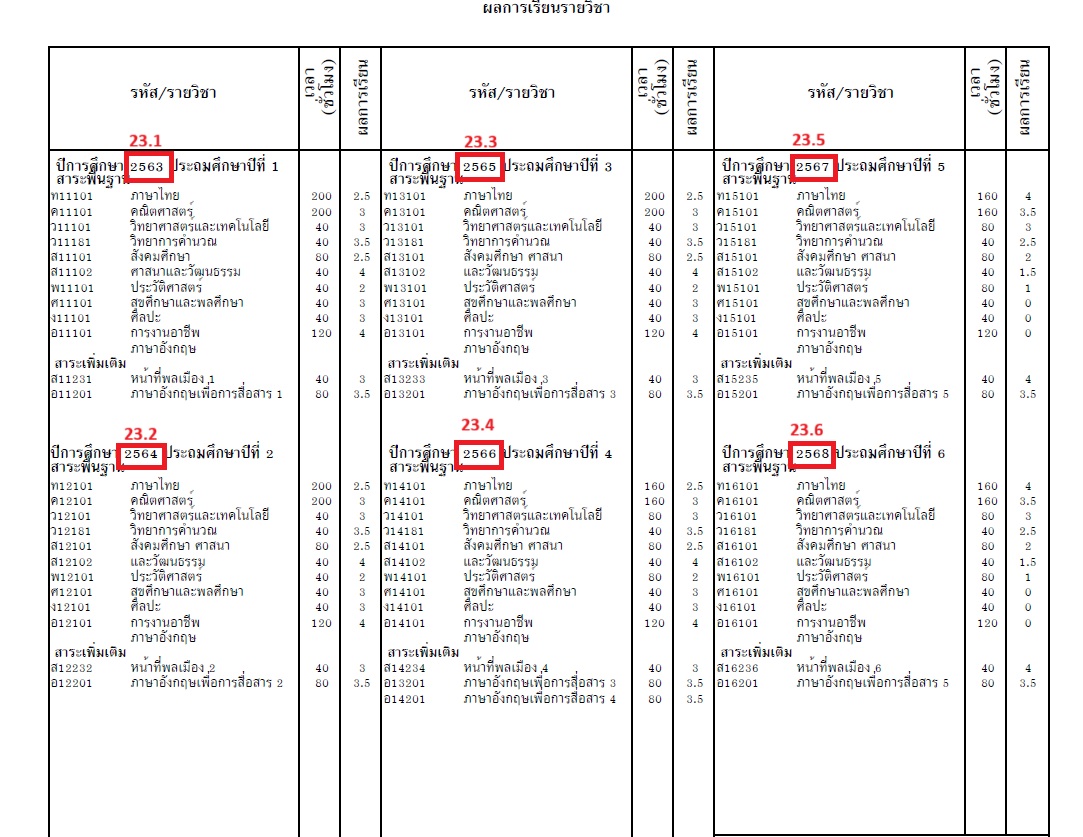
|
SNO. |
Object Label |
New Object Label |
|---|---|---|
|
23.1 |
grade 1 basic transcript |
Grade 1 Study Year page1 |
|
23.2 |
Grade 2 heading |
Grade 2 Study Year page1 |
|
23.3 |
Grade 3 basic |
Grade 3 Study Year page1 |
|
23.4 |
Grade 4 heading |
Grade 4 Study Year page1 |
|
23.5 |
Grade 5 basic |
Grade 5 Study Year page1 |
|
23.6 |
Grade 6 heading |
Grade 6 Study Year page1 |
PowerQuery: ~(*powerquery;query=com.powerschool.th.report.dat.stuyearbygradelevel;fields=thaiyear;arg.storecode=Y1;arg.gradelevel=1)
Screen: historical grade
Description: This DAT shows the student's study year using the arguments storecode and gradelevel, retrieving these fields:
-
thaiyear: Gets the Thai academic year from the arguments.
-
year: Gets the academic year from the arguments.
-
arg.storecode: Required store code argument.
-
Example:
storecode=Y1, sets store code to "Y1". -
arg.gradelevel: Required grade level argument.
-
Example:
gradelevel=1, sets grade level to 1
24.Course info
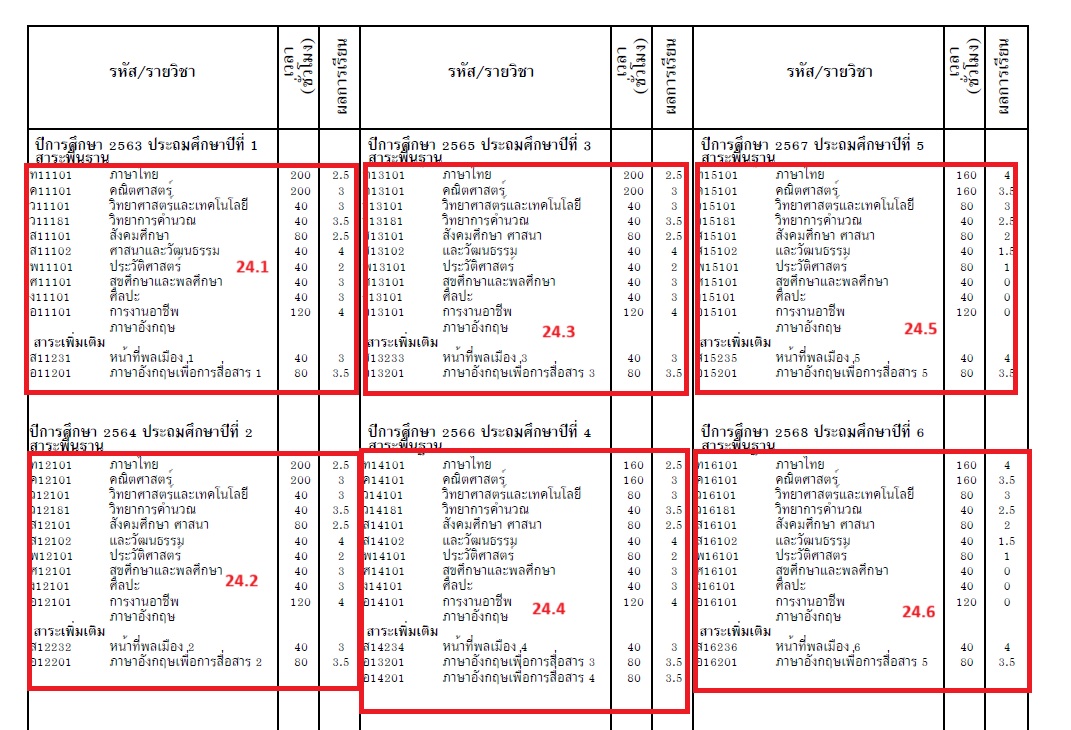
-
Object Label changes:
|
SNO |
Object Label |
New Object Label |
|---|---|---|
|
24.1 |
Grade 1 basic trans |
Grade 1 transcript page1 |
|
24.2 |
grade2 basic |
Grade 2 transcript page1 |
|
24.3 |
Grade 3 basic trans |
Grade 3 transcript page1 |
|
24.4 |
Grade 4 basic trans |
Grade 4 transcript page1 |
|
25.5 |
Grade 5 basic trans |
Grade 5 transcript page1 |
|
25.6 |
Grade 6 trans |
Grade 6 transcript page |
-
Powerquery:
-
~(*powerquery;query=com.powerschool.th.report.dat.courseinfotable;arg.shownumber=y;arg.storecode=Y1;arg.gradelevel=1;arg.credittype=basic;arg.excludedcreditlist=ld;arg.showgpa=y;arg.showgrade=y;fields=course_number,alt_course_number,course_name,alt_course_name,earnedcrhrs,gpa_points,credits,grade)
-
-
Screen: Course info, Historical Grades
-
Description:
-
This DAT displays course name, course number, alternate course number, alternate course name, earned credit hours, GPA points, credits, and grade by course for specified grade levels, store code, and credit type
-
Uses arguments:
-
arg.storecode: Required store code (e.g., storecode=Y1) -
arg.credittypelist: Required credit types list (e.g., credittypelist=basic) -
arg.gradelevel: minimum grade level (e.g., gradelevel=4) -
arg.locale:Default locale is US_th; display alternate course name based on locale if needed -
arg.orderwith: Sort order options (credittype, course_number, course_name)-
Default sort is by credit type; to sort by course name or number, use:
-
arg.orderwith=course_number -
arg.orderwith=course_name
-
-
-
-
-
-
Fields Included:
-
course_number: Gets the course number.
-
alt_course_number: Gets the alternative course number.
-
course_name: Gets the course name.
-
alt_course_name: Gets the alternative course name.
-
earnedcrhrs: Gets earned credit hours.
-
gpa_points: Gets GPA points.
-
credits: Gets credits earned.
-
grade: Gets the course grade.
-
-
Table Format: To display course info in a tabular format with proper alignment, we used PowerQuery fields in the table as shown below .
-
Note: The Object Report table structure should be in a single line
-
<table border="0"><tr><th width="42">~(*powerquery;query=com.powerschool.th.report.dat.courseinfotable;arg.shownumber=y;arg.storecode=Y1;arg.gradelevel=1;arg.credittypelist=basic;arg.excludedcreditlist=ld;arg.showgpa=y;arg.showgrade=y;fields=course_number)</th><th width="88">~(*powerquery;query=com.powerschool.th.report.dat.courseinfotable;arg.shownumber=y;arg.storecode=Y1;arg.gradelevel=1;arg.credittypelist=basic;arg.excludedcreditlist=ld;arg.showgpa=y;arg.showgrade=y;fields=course_name)</th><th width="24" align="center">~(*powerquery;query=com.powerschool.th.report.dat.courseinfotable;arg.shownumber=y;arg.storecode=Y1;arg.gradelevel=1;arg.credittypelist=basic;arg.excludedcreditlist=ld;arg.showgpa=y;arg.showgrade=y;fields=earnedcrhrs)</th><th width="19" align="center">~(*powerquery;query=com.powerschool.th.report.dat.courseinfotable;arg.shownumber=y;arg.storecode=Y1;arg.gradelevel=1;arg.credittypelist=basic;arg.excludedcreditlist=ld;arg.showgpa=y;arg.showgrade=y;fields=gpa_points)</th></tr><tr><td><b>สาระเพิ่มเติม</b></td></tr><tr><th width="42">~(*powerquery;query=com.powerschool.th.report.dat.courseinfotable;arg.shownumber=y;arg.storecode=Y1;arg.gradelevel=1;arg.credittypelist=elec;arg.excludedcreditlist=ld;arg.showgpa=y;arg.showgrade=y;fields=course_number)</th><th width="88">~(*powerquery;query=com.powerschool.th.report.dat.courseinfotable;arg.shownumber=y;arg.storecode=Y1;arg.gradelevel=1;arg.credittypelist=elec;arg.excludedcreditlist=ld;arg.showgpa=y;arg.showgrade=y;fields=course_name)</th><th width="24" align="center">~(*powerquery;query=com.powerschool.th.report.dat.courseinfotable;arg.shownumber=y;arg.storecode=Y1;arg.gradelevel=1;arg.credittypelist=elec;arg.excludedcreditlist=ld;arg.showgpa=y;arg.showgrade=y;fields=earnedcrhrs)</th><th width="19" align="center">~(*powerquery;query=com.powerschool.th.report.dat.courseinfotable;arg.shownumber=y;arg.storecode=Y1;arg.gradelevel=1;arg.credittypelist=elec;arg.excludedcreditlist=ld;arg.showgpa=y;arg.showgrade=y;fields=gpa_points)</th></tr></table>
-
-
Course info page2:
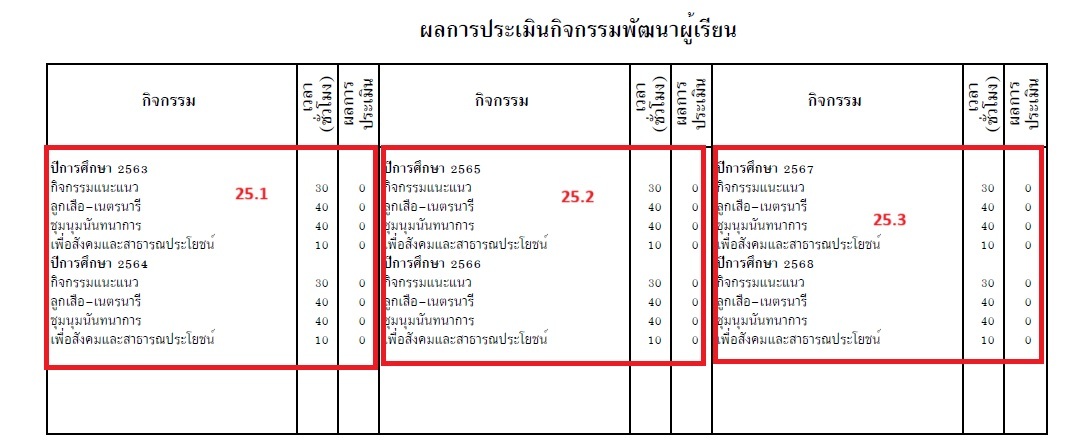
Object label:
|
SNO |
Object label |
New Object Label |
|---|---|---|
|
25.1 |
page 2 garde 1 LDA |
page 2 garde1,2 |
|
25.2 |
Grade 3 Lda |
Page 2 grade3,4 |
|
25.3 |
Grade 5 LDA |
Page 2 Grade 5,6 |
Description:
Everything is similar to the above(24),and for displaying result we use field as grade in powerquery with changes in arguments and the table format for alignment as below
<table border="0"><tr><th width="130"><b>ปีการศึกษา ~(*powerquery;query=com.powerschool.th.report.dat.stuyearbygradelevel;fields=thaiyear;arg.storecode=Y1;arg.gradelevel=1)</b></th><th width="24"></th><th width="19"></th></tr><tr><th width="130">~(*powerquery;query=com.powerschool.th.report.dat.courseinfotable;arg.storecode=Y1;arg.gradelevel=1;arg.credittypelist=lda;arg.shownumber=n;arg.excludedcreditlist=ld;arg.showgpa=y;arg.showgrade=y;fields=course_name)</th><th width="24" align="center">~(*powerquery;query=com.powerschool.th.report.dat.courseinfotable;arg.storecode=Y1;arg.gradelevel=1;arg.credittypelist=lda;arg.shownumber=n;arg.excludedcreditlist=ld;arg.showgpa=y;arg.showgrade=y;fields=earnedcrhrs)</th><th width="19" align="center">~(*powerquery;query=com.powerschool.th.report.dat.courseinfotable;arg.storecode=Y1;arg.gradelevel=1;arg.credittypelist=lda;arg.shownumber=n;arg.excludedcreditlist=ld;arg.showgpa=y;arg.showgrade=y;fields=grade)</th></tr><tr><th width="130"><b>ปีการศึกษา ~(*powerquery;query=com.powerschool.th.report.dat.stuyearbygradelevel;fields=thaiyear;arg.storecode=Y1;arg.gradelevel=2)</b></th><th width="24"></th><th width="19"></th></tr><tr><th width="130">~(*powerquery;query=com.powerschool.th.report.dat.courseinfotable;arg.storecode=Y1;arg.gradelevel=2;arg.credittypelist=lda;arg.shownumber=n;arg.excludedcreditlist=ld;arg.showgpa=y;arg.showgrade=y;fields=course_name)</th><th width="24" align="center">~(*powerquery;query=com.powerschool.th.report.dat.courseinfotable;arg.storecode=Y1;arg.gradelevel=2;arg.credittypelist=lda;arg.shownumber=n;arg.excludedcreditlist=ld;arg.showgpa=y;arg.showgrade=y;fields=earnedcrhrs)</th><th width="19" align="center">~(*powerquery;query=com.powerschool.th.report.dat.courseinfotable;arg.storecode=Y1;arg.gradelevel=2;arg.credittypelist=lda;arg.shownumber=n;arg.excludedcreditlist=ld;arg.showgpa=y;arg.showgrade=y;fields=grade)</th></tr></table>
Evaluation
-
Evaluation Basic
-
Object Label: evelution result L1 val
-
New Object Label: evelution Basic L1
-
PowerQuery: ~(decode;~(*powerquery;query=com.powerschool.th.report.dat.overallgradegroupbymultiplegradelevels;fields=result;arg.storecode=Y1;arg.mingradelevel=4;arg.maxgradelevel=6;arg.credittypelist=basic);1;ผ่านทุกรายวิชา;2;ผ่านทุกรายวิชา;3;ผ่านทุกรายวิชา;4;ผ่านทุกรายวิชา ;ไม่ผ่าน )
-
Screen: Historic grades, Courses, Gradescale
-
Description: Designed to gather overall grade data categorized by multiple grade levels with parameters: fields=result, arg.storecode=Y1, arg.mingradelevel=4, arg.maxgradelevel=6, arg.credittypelist=basic
-
-
Evaluation Basic Result
-
Object Label: evelu basic PF
-
New Object Label: evelution Basic L1 PF
-
PowerQuery:
-
~(decode;~(*powerquery;query=com.powerschool.th.report.dat.overallgradegroupbymultiplegradelevels;fields=result;arg.storecode=Y1;arg.mingradelevel=4;arg.maxgradelevel=6;arg.credittypelist=basic);F;ล้มเหลว ;ผ่าน )
-
-
Screen:
-
Description: The PowerQuery DAT returns F if any student has one subject failing in the credit type given in basic; using decode, we can display fail or else display pass.
-
|
Object Label |
New Object Label |
Credit type used |
|---|---|---|
|
evelution result L2 val |
evelution RD L2 |
RD |
|
L2 PF |
evelution DC L2 PF |
RD |
|
evelution result L3 val |
evelution DC L3 |
DC |
|
L3 PF |
evaluation DC L3 PF |
DC |
|
evelution result L4 val |
evelution CO L4 |
CO |
|
L4 PF |
evelution CO L4 PF |
CO |
For the above, we used the same Power Query DAT, adjusting the DAT argument to aggregate multiple grade levels. Alternatively, use the Power Query DAT below to obtain grade, percent, and GPA points for a single course by passing the credit type, course number, or both as arguments. Handle decoding based on the need; an example is provided below
~(*powerquery;query=com.powerschool.th.report.dat.evelutioncoursedetails;fields=grade,percent,gpa_points;arg.storecode=Y1;arg.gradelevel=6;arg.credittype=RD)
applied decode to get the grade and display the value
eg:~(decode;~(*powerquery;query=com.powerschool.th.report.dat.evelutioncoursedetails;fields=grade;arg.storecode=Y1;arg.credittype=RD;arg.gradelevel=6);E;ดีเยี่ยม;G;ดี;P;ผ่าน;F;ล้มเหลว;~(*powerquery;query=com.powerschool.th.report.dat.evelutioncoursedetails;fields=grade;arg.storecode=Y1;arg.credittype=CO;arg.gradelevel=6))
applied decode to Find Pass or Fail
  eg:~(decode;~(*powerquery;query=com.powerschool.th.report.dat.evelutioncoursedetails;fields=grade;arg.storecode=Y1;arg.gradelevel=6;arg.credittype=RD);F;ล้มเหลว;ผ่าน)
Date Section
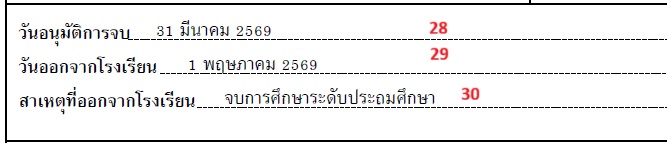
-
Graduation date (วันอนุมัติการจบ)
-
Object Label: Date1 Grade value
-
New Object Label: Graduation date
-
PowerQuery:
-
~(*powerquery;query=com.powerschool.th.report.dat.thaidateformat;arg.gregoriandate=~(*powerquery;query=com.powerschool.th.report.dat.graduationdetails;arg.gradelevel=6;arg.dateformat=DD-MON-YYYY;fields=graduationdate);fields=thaidate;)
-
-
Screen: graduation details
-
Description:
-
The PowerQuery DAT retrieves the graduation date for the specified grade level (grade level 6).
-
The date format used is DD-MON-YYYY.
-
The graduation date is converted to Thai format using the provided PowerQuery DAT.
-
-
-
Exit Date
-
Object Label: Date 2 exit Date
-
New Object Label: Exit Date
-
PowerQuery:
-
~(*powerquery;query=com.powerschool.th.report.dat.thaidateformat;arg.gregoriandate=~(*powerquery;query=com.powerschool.th.report.dat.reenrollmentdetails;arg.gradelevel=6;fields=exitdate);fields=thaidate)
-
-
Screen: enrollment history
-
Description:
-
The PowerQuery DAT retrieves the exit date for the specified grade level (grade level 6) from the reenrollment details.
-
The exit date is then converted to Thai format using the Gregorian date argument.
-
-
-
Exit code reason
-
Object Label: Date 3 val exit code
-
New Object Label: Exit code reason
-
PowerQuery: ~(*powerquery;query=com.powerschool.th.report.dat.reenrollmentdetails;arg.gradelevel=6;arg.locale=US_th;fields=exitreason)
-
Screen: Enrollment History
-
Description:
-
The PowerQuery DAT returns the display value for the student exit code.
-
It is based on the specified grade level and locale argument for translation.
-
The default translation is US_th.
-
To obtain a different translation, set arg.locale to another locale.
-
-
O-Net
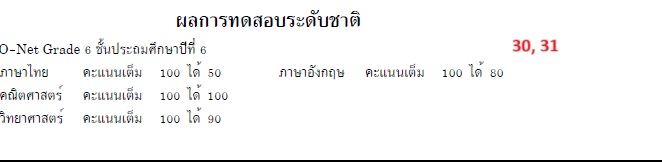
-
validate empty O-net
-
Object Label: empty onet
-
New Object Label: validate empty O-net
-
PowerQuery: ~(decode;~(*powerquery;query=com.powerschool.th.report.dat.test.validate;arg.testname=O-Net ;arg.gradelevel=6;fields=result);N;<tabc 2.1>- ;)
-
Screen: Test
-
Description:
-
The PowerQuery DAT checks if a student has an entry for the specified test name (arg.testname) for the given grade level (arg.gradelevel).
-
Example: For arg.testname=O-Net and arg.gradelevel=6, it returns Y if an entry exists.
-
If the test name differs, the test notes should be passed.
-
Query example: ~(*powerquery;query=com.powerschool.th.report.dat.test.validate;arg.testname=O-Net Grade 6;arg.gradelevel=6;fields=result)
-
-
-
onet heading with info
-
Object Label: onet heading
-
New Object Label: onet heading with info
-
Report Label: (none)
-
PowerQuery:
-
Utilizes a PowerQuery DAT to validate test results for O-Net Grade 6.
-
Queries include:
-
Thai Language: ~(*powerquery;query=com.powerschool.th.report.dat.testscore;arg.preffield=districtname;arg.testname=O-Net Grade 6;arg.subjectname=THAI;arg.gradelevel=6;fields=numscore)
-
English Language: ~(*powerquery;query=com.powerschool.th.report.dat.testscore;arg.preffield=districtname;arg.testname=O-Net Grade 6;arg.subjectname=ENG;arg.gradelevel=6;fields=numscore)
-
Mathematics: ~(*powerquery;query=com.powerschool.th.report.dat.testscore;arg.preffield=districtname;arg.testname=O-Net Grade 6;arg.subjectname=MATH;arg.gradelevel=6;fields=numscore)
-
Science: ~(*powerquery;query=com.powerschool.th.report.dat.testscore;arg.preffield=districtname;arg.testname=O-Net Grade 6;arg.subjectname=SCI;arg.gradelevel=6;fields=numscore)
-
-
-
Screen: Test.Test Score
-
Description:
-
Test score details are displayed only if the entry exists.
-
The PowerQuery DAT checks if the test score is valid using the decode function.
-
If valid (y), it prints the test score details for the specified subjects and grade level.
-
Arguments include testname, subjectname, and gradelevel, with fields for either number score or percentage score.
-
-
GPAX
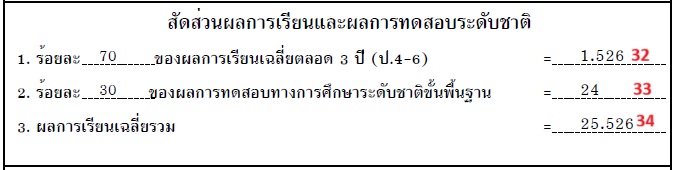
-
Gpax testweight
-
Object Label: testweight onet
-
New Object Label: Gpax testweight
-
PowerQuery:
-
~(*powerquery;query=com.powerschool.th.report.dat.gpax;arg.storecode=Y1;arg.mingradelevel=4;arg.credittypelist=basic;arg.maxgradelevel=6;arg.testcolumn=numscore;arg.testweight=30;arg.gradeweight=70;arg.testname=O-Net Grade 6;fields=testweight)
-
-
Screen: historicalgrades, testscores
-
Description:
-
Utilized a PowerQuery DAT to retrieve the testweight based on the percentage specified in
arg.testweight. -
Minimum and maximum grade levels are passed using
arg.mingradelevelandarg.maxgradelevel. -
Test name is passed using
arg.testname. -
Credit type is specified using
credittypelist.
-
-
-
Gpax gradewieght
-
Object Label: weighted credit basic percent
-
New Object Label: Gpax gradeweight
-
PowerQuery:
-
~(*powerquery;query=com.powerschool.th.report.dat.gpax;arg.storecode=Y1;arg.mingradelevel=4;arg.credittypelist=basic;arg.maxgradelevel=6;arg.testcolumn=numscore;arg.testweight=30;arg.gradeweight=70;arg.testname=O-Net Grade 6;fields=gradeweight)
-
-
Screen: historicalgrades, testscores
-
Description:
-
Utilized PowerQuery DAT to retrieve gradeweight based on the percentage specified in
arg.gradeweight. -
Arguments include:
-
Minimum and maximum grade levels:
arg.mingradelevel,arg.maxgradelevel -
Test name:
arg.testname -
Credit type:
credittypelist
-
-
-
-
GPAX
-
Object Label: sum of basic onet
-
New Object Label: GPAX result
-
PowerQuery:
-
~(*powerquery;query=com.powerschool.th.report.dat.gpax;arg.storecode=Y1;arg.mingradelevel=4;arg.credittypelist=basic;arg.maxgradelevel=6;arg.testcolumn=numscore;arg.testweight=30;arg.gradeweight=70;arg.testname=O-Net Grade 6;fields=result)
-
-
Screen: historicalgrades, testscores
-
Description: This powerquery data returns the GPAX total by summing the test weight and grade weight.
-
Learning Subject Group
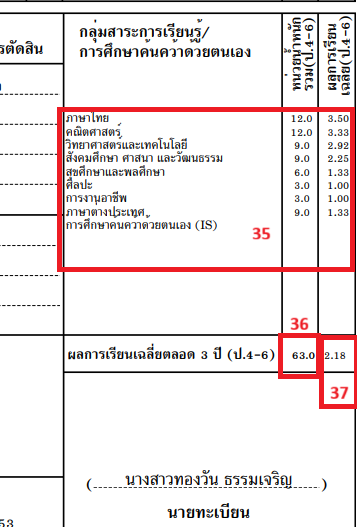
-
Avg group of subject
-
Object Label: Total credits page2
-
New Object Label: Avg group of subjects
-
PowerQuery: ~(*powerquery;query=com.powerschool.th.report.dat.credittypegrouping;fields=credit_hours,weighted_credit;arg.storecode=Y1;arg.mingradelevel=4;arg.maxgradelevel=6;arg.credittypelist=01basicTH,11ElecTH,02basicMA,)
-
Screen: Historical grades
-
Description:
-
This DAT displays the sum of credit hours and Average weighted_credit for courses within a specified grade range and selected credit types. It retrieves course-level historical grade data based on the provided arguments, applying the course name in static. As detailed below, it derives a table format of credit hours and weighted_credit for each subject based on the credit type list argument
-
-
Table Format: To display course info in a tabular format with proper alignment, we used PowerQuery fields in the table as shown below.
-
Note: The Object Report table structure should be in a single line
-
<table border="0"><tr><th width="129" align="left">ภาษาไทย</th><th width="25" align="center">~(*powerquery;query=com.powerschool.th.report.dat.credittypegrouping;fields=credit_hours;arg.storecode=Y1;arg.mingradelevel=4;arg.maxgradelevel=6;arg.credittypelist=01basicTH)</th><th width="18" align="center">~(*powerquery;query=com.powerschool.th.report.dat.credittypegrouping;fields=weighted_credit;arg.storecode=Y1;arg.mingradelevel=4;arg.maxgradelevel=6;arg.credittypelist=01basicTH)</th></tr><tr><th width="129" align="left">คณิตศาสตร์</th><th width="25" align="center">~(*powerquery;query=com.powerschool.th.report.dat.credittypegrouping;fields=credit_hours;arg.storecode=Y1;arg.mingradelevel=4;arg.maxgradelevel=6;arg.credittypelist=02basicMA)</th><th width="18" align="center">~(*powerquery;query=com.powerschool.th.report.dat.credittypegrouping;fields=weighted_credit;arg.storecode=Y1;arg.mingradelevel=4;arg.maxgradelevel=6;arg.credittypelist=02basicMA)</th></tr><tr><th width="129" align="left">วิทยาศาสตร์และเทคโนโลยี</th><th width="25" align="center">~(*powerquery;query=com.powerschool.th.report.dat.credittypegrouping;fields=credit_hours;arg.storecode=Y1;arg.mingradelevel=4;arg.maxgradelevel=6;arg.credittypelist=03basicST,04basicST)</th><th width="18" align="center">~(*powerquery;query=com.powerschool.th.report.dat.credittypegrouping;fields=weighted_credit;arg.storecode=Y1;arg.mingradelevel=4;arg.maxgradelevel=6;arg.credittypelist=03basicST,04basicST)</th></tr><tr><th width="129" align="left">สังคมศึกษา ศาสนา และวัฒนธรรม</th><th width="25" align="center">~(*powerquery;query=com.powerschool.th.report.dat.credittypegrouping;fields=credit_hours;arg.storecode=Y1;arg.mingradelevel=4;arg.maxgradelevel=6;arg.credittypelist=05basicSO,06basicHT,13ElecHT)</th><th width="18" align="center">~(*powerquery;query=com.powerschool.th.report.dat.credittypegrouping;fields=weighted_credit;arg.storecode=Y1;arg.mingradelevel=4;arg.maxgradelevel=6;arg.credittypelist=05basicSO,06basicHT,13ElecHT)</th></tr><tr><th width="129" align="left">สุขศึกษาและพลศึกษา</th><th width="25" align="center">~(*powerquery;query=com.powerschool.th.report.dat.credittypegrouping;fields=credit_hours;arg.storecode=Y1;arg.mingradelevel=4;arg.maxgradelevel=6;arg.credittypelist=07basicHP)</th><th width="18" align="center">~(*powerquery;query=com.powerschool.th.report.dat.credittypegrouping;fields=weighted_credit;arg.storecode=Y1;arg.mingradelevel=4;arg.maxgradelevel=6;arg.credittypelist=07basicHP)</th></tr><tr><th width="129" align="left">ศิลปะ</th><th width="25" align="center">~(*powerquery;query=com.powerschool.th.report.dat.credittypegrouping;fields=credit_hours;arg.storecode=Y1;arg.mingradelevel=4;arg.maxgradelevel=6;arg.credittypelist=08basicAR)</th><th width="18" align="center">~(*powerquery;query=com.powerschool.th.report.dat.credittypegrouping;fields=weighted_credit;arg.storecode=Y1;arg.mingradelevel=4;arg.maxgradelevel=6;arg.credittypelist=08basicAR)</th></tr><tr><th width="129" align="left">การงานอาชีพ</th><th width="25" align="center">~(*powerquery;query=com.powerschool.th.report.dat.credittypegrouping;fields=credit_hours;arg.storecode=Y1;arg.mingradelevel=4;arg.maxgradelevel=6;arg.credittypelist=09basicOC)</th><th width="18" align="center">~(*powerquery;query=com.powerschool.th.report.dat.credittypegrouping;fields=weighted_credit;arg.storecode=Y1;arg.mingradelevel=4;arg.maxgradelevel=6;arg.credittypelist=09basicOC)</th></tr><tr><th width="129" align="left">ภาษาต่างประเทศ</th><th width="25" align="center">~(*powerquery;query=com.powerschool.th.report.dat.credittypegrouping;fields=credit_hours;arg.storecode=Y1;arg.mingradelevel=4;arg.maxgradelevel=6;arg.credittypelist=10basicFO,15ElecFO)</th><th width="18" align="center">~(*powerquery;query=com.powerschool.th.report.dat.credittypegrouping;fields=weighted_credit;arg.storecode=Y1;arg.mingradelevel=4;arg.maxgradelevel=6;arg.credittypelist=10basicFO,15ElecFO)</th></tr><tr><th width="129" align="left">การศึกษาค้นคว้าด้วยตนเอง (IS)</th><th width="25" align="center">-</th><th width="18" align="center">-</th></tr></table>
-
Sum of credit hours
-
Object Label: page 2 total credit
-
New Object Label: Sum of credit hrs
-
PowerQuery: ~(*powerquery;query=com.powerschool.th.report.dat.credittypegrouping;fields=credit_hours;arg.storecode=Y1;arg.mingradelevel=4;arg.maxgradelevel=6;arg.credittypelist=01basicTH,02basicMA,03basicST,04basicST,05basicSO,06basicHT,07basicHP,08basicAR,09basicOC,10basicFO,13ElecHT,15ElecFO)
-
Screen:Historical grades,Course info
-
Description: This PowerQuery DAT calculates the total credit hours for students based on specified minimum and maximum grades and credit types within a designated store code.
-
Arguments:
-
arg.storecode=Y1
-
arg.mingradelevel=4
-
arg.maxgradelevel=6
-
arg.credittypelist=01basicTH,02basicMA,
-
-
-
-
sum of avg weight credit
-
Object Label: Page 2 avg weight credit
-
New Object Label: sum of avg weight credit
-
PowerQuery: ~(*powerquery;query=com.powerschool.th.report.dat.credittypegrouping;fields=weighted_credit;arg.storecode=Y1;arg.mingradelevel=4;arg.maxgradelevel=6;arg.credittypelist=01basicTH,02basicMA,03basicST,04basicST,05basicSO,06basicHT,07basicHP,08basicAR,09basicOC,10basicFO,13ElecHT,15ElecFO)
-
Screen: Historical grades, Course info
-
Description: Used to retrieve the average weighted credit for students or students based on specified minimum and maximum grades and credit types within a designated store code.
-
Arguments:
-
arg.storecode=Y1
-
arg.mingradelevel=4
-
arg.maxgradelevel=6
-
arg.credittypelist=01basicTH,02basicMA,
-
-
-
Reprint
The report follows the same setup as above, with additional fields such as signatures, transcript number, and certificate number, explained in detail below.
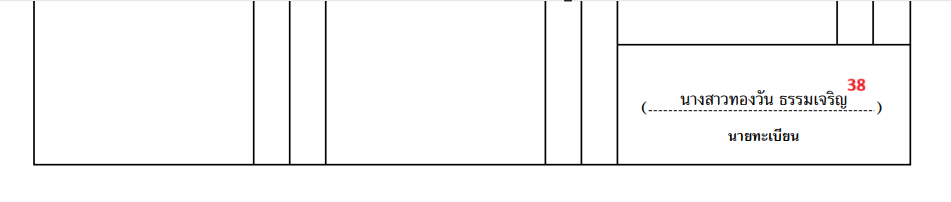
-
Registrar Name (นายทะเบียน)
-
Object Label: page1 register name
-
New Object Label: School Registrar Name Page1
-
PowerQuery: ~([39]Registrar_name)
-
Screen: School
-
Description:
This DAT is used to display the current school Registrar name of the selected students.
-
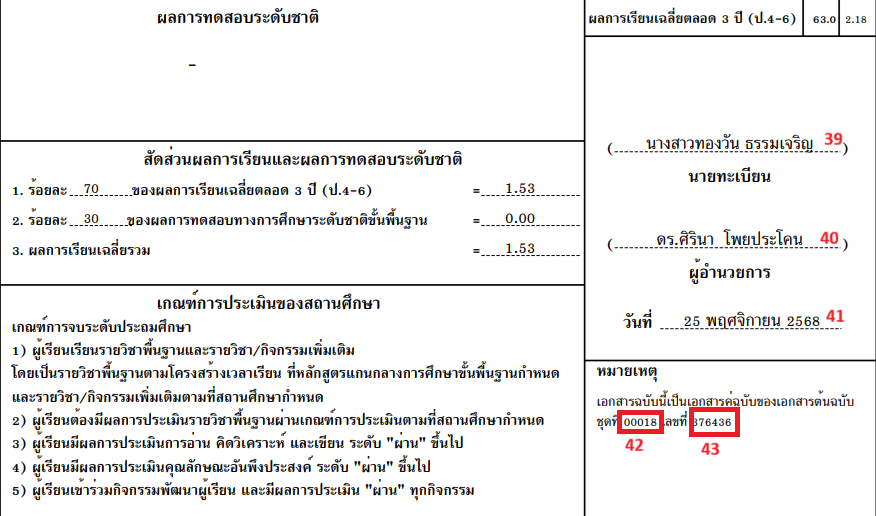
-
Registrar Name (นายทะเบียน)
-
Object Label: sign 1 registar name
-
New Object Label: School Registrar Name Page2
-
PowerQuery: ~([39]Registrar_name)
-
Screen: School
-
Description: This DAT is used to display the current school Registrar name of the selected students.
-
-
Director Name (นายทะเบียน)
-
Object Label: sign2 principal
-
New Object Label: School Principal Name
-
PowerQuery: ~([39]Principal)
-
Screen: School
-
Description: This DAT is used to display the current school Principal name of the selected students.
-
-
Current Date (วันที่)
-
Object Label: Date above note value
-
New Object Label: Current Date
-
PowerQuery: ~(*powerquery;query=com.powerschool.th.report.dat.thaidateformat;fields=thaidate;arg.gregoriandate=^(f.currentdate;dateformat=DD-MM-YYYY);)
-
Screen:
-
Description: This DAT is used to display the current Date in Thai format
-
-
Transcript Number
-
Object Label: Notes text.
-
New Object Label: Transcript &running Num
-
PowerQuery: ~(*powerquery;query=com.powerschool.th.report.dat.graduationdetails;arg.gradelevel=6;fields=transcriptnumber)
-
Screen: Graduation info
-
Description: This DAT displays the transcript number for the specified grade level in argument gradelevel
-
-
Running Number (วันที่)
-
Object Label: Notes text.
-
New Object Label: Transcript & running Num
-
PowerQuery: ~(*powerquery;query=com.powerschool.th.report.dat.graduationdetails;arg.gradelevel=6;fields=runningnumber)
-
Screen: Graduation info
-
Description: This DAT displays the transcript number for the specified grade level in argument gradelevel
-
42 and 43 will be placed in single text object