-
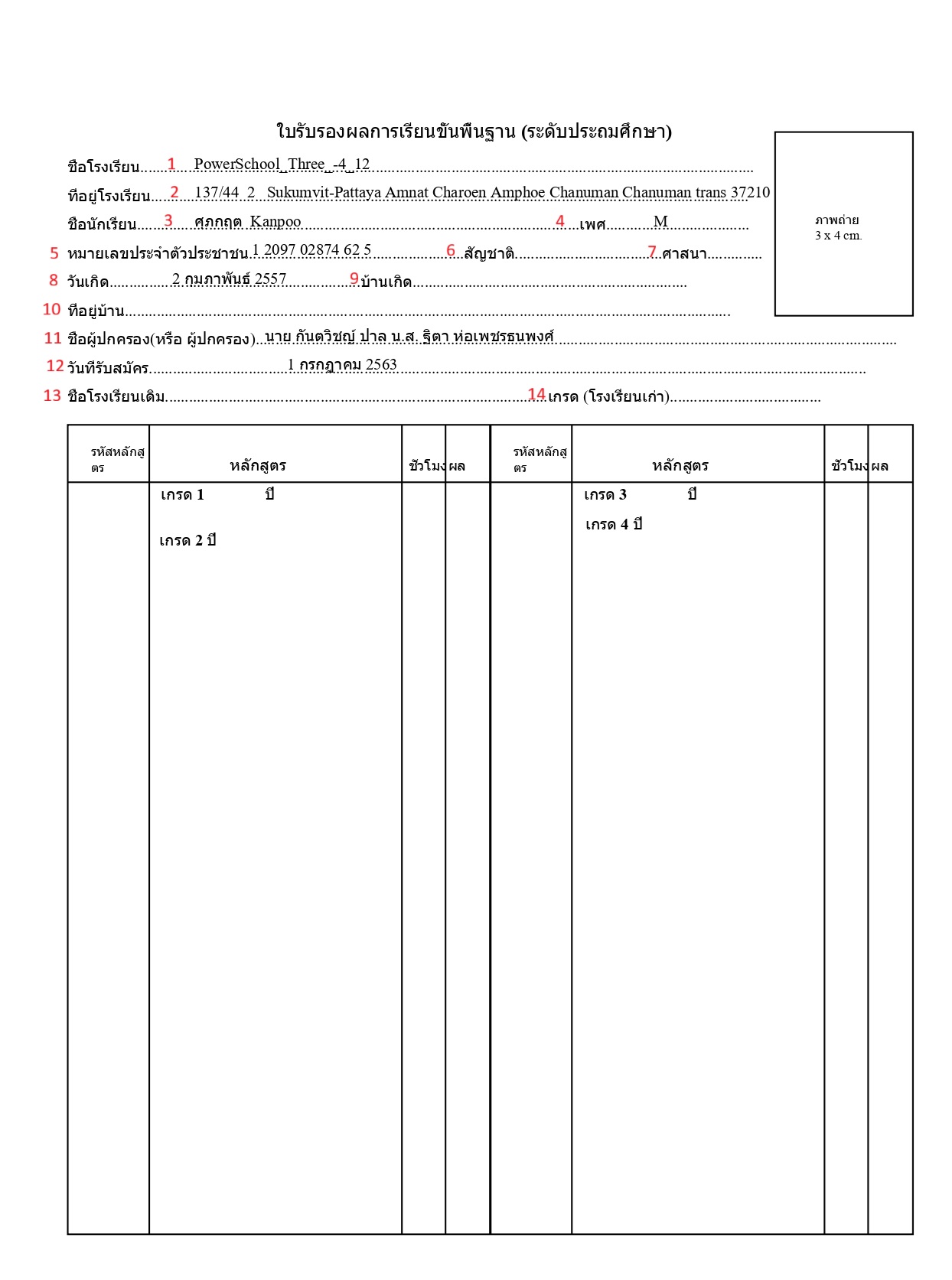
ชื่อโรงเรียน (School Name)
-
Object Number: 46
-
Old Name: school_value
-
Object Name: school name
-
PowerQuery: ~([39]Name)
-
Screen: School info
Description: This DAT is used to display the school name of the student. If the user needs to display the alternate school name use the DAT ~([schools.schoolscorefields]altschoolname)
-
ที่อยู่โรงเรียน (School Address)
-
Object Number: 44
-
Old Name: schoolAddress_value
-
Object Name: school address
-
PowerQuery: ~([schools.s_tha_schools_x]school_HouseNo) ~([schools.s_tha_schools_x]school_Village) ~([schools.s_tha_schools_x]school_Moo) ~([schools.s_tha_schools_x]school_Alleyway) ~([39]schooladdress) ~([schools.s_tha_schools_x]school_Road) ~(*powerquery;query=com.powerschool.th.admin.dat.schoolinfo;fields=school_provience) ~(*powerquery;query=com.powerschool.th.admin.dat.schoolinfo;fields=school_district) c ~(*powerquery;query=com.powerschool.th.admin.dat.schoolinfo;fields=school_zip)
-
Screen: School info
Description:
-
~([schools.s_tha_schools_x]school_HouseNo) - This DAT is used to display the House No of the school
-
~([schools.s_tha_schools_x]school_Village) - This DAT is used to display the Village/Building of the school
-
~([schools.s_tha_schools_x]school_Moo) - This DAT is used to display the Moo of the school
-
~([schools.s_tha_schools_x]school_Alleyway) - This DAT is used to display the Alleyway of the school
-
~([39]schooladdress) - This DAT is used to display the School Address (Full) of the school
-
~([schools.s_tha_schools_x]school_Road) - This DAT is used to display the Road of the school
-
~(*powerquery;query=com.powerschool.th.admin.dat.schoolinfo;fields=school_provience) - This DAT is used to display the School Province
-
~(*powerquery;query=com.powerschool.th.admin.dat.schoolinfo;fields=school_district) - This DAT is used to display the School District
-
~(*powerquery;query=com.powerschool.th.admin.dat.schoolinfo;fields=school_zip) - This DAT is used to display the School Zipcode
-
ชื่อนักเรียน (Student Name)
-
Object Number: 49
-
Old Name: studentName_value
-
Object Name: student name
-
PowerQuery: ^(First_Name) ^(Middle_Name) ^(Last_Name)
-
Screen: Student Demographics
Description:
-
^(First_Name) - This DAT is used to display the alternate first name of the student. Use ~(*powerquery;query=com.powerschool.th.dat.studentinfo;fields=altfirstname) to get the alternate first name of the student.
-
^(Middle_Name) - This DAT is used to display the middle name of the student. Use ~(*powerquery;query=com.powerschool.th.dat.studentinfo;fields=altmiddlename) to get the alternate middle name of the student.
-
^(Last_Name) - This DAT is used to display the last name of the student. Use ~(*powerquery;query=com.powerschool.th.dat.studentinfo;fields=altlastname) to get the alternate last name of the student.
-
เพศ (Sex)
-
Object Number: 48
-
Old Name: gender_value
-
Object Name: Sex
-
PowerQuery: ~(gender)
-
Screen: Student Demographics
Description: This DAT is used to display the gender of the student.
-
หมายเลขประจําตัวประชาชน (ID Number)
-
Object Number: 37
-
Old Name: nationalId_value
-
Object Name: National ID
-
PowerQuery: ~(*powerquery;query=com.powerschool.th.dat.studentinfo;fields=formatted_nationalid)
-
Screen: Student Demographics
Description: This DAT is used to present the student's national ID in the Thai format, which is X XXXX XXXXX XX X.
-
สัญชาติ (Nationality)
-
Object Number: 38
-
Old Name: nationality_value
-
Object Name: Nationality
-
PowerQuery: ~(*powerquery;query=com.powerschool.th.dat.studentinfo;fields=nationality;arg.locale=TH_th)
-
Screen: Student Demographics
Description: This DAT is used to display the nationality of the student.
-
ศาสนา (Religion)
-
Object Number: 43
-
Old Name: religion_value
-
Object Name: Religion
-
PowerQuery: ~(*powerquery;query=com.powerschool.th.dat.studentinfo;fields=religion;arg.locale=TH_rg)
-
Screen: Student Demographics
Description: This DAT is used to display the Religion of the student.
-
วันเกิด (Date of Birth)
-
Object Number: 24
-
Old Name: dob_value
-
Object Name: Date of Birth
-
PowerQuery: ^(decode;^(DOB;dateformat=DD/MM/YYYY);00/00/0000; ;~(*powerquery;query=com.powerschool.th.report.dat.thaidateformat;fields=thaidate;arg.gregoriandate=^(DOB;dateformat=DD/MM/YYYY)))
-
Screen: Student Demographics
Description: This DAT is used to display the DOB after the formatted gregorian date in the argument to Thai date format. Ex:10-01-2001, output(Thaidate):10 มกราคม 2257.
-
arg.gregoriandate: Required argument indicating the Gregorian date to be converted to the Thai date format.
To ensure the Gregorian Date passed in the argument is valid, it should not be null or in the format 0/00/0000. Use the decode function for validation, as shown in the example below.
^(decode;^(DOB;dateformat=DD/MM/YYYY);00/00/0000; ;~(*powerquery;query=com.powerschool.th.report.dat.thaidateformat;fields=thaidate;arg.gregoriandate=^(DOB;dateformat=DD/MM/YYYY)))
-
บ้านเกิด (Place of Birth)
-
Object Number: 42
-
Old Name: placeofbirth_value
-
Object Name: Place of Birth
-
PowerQuery: ^(S_THA_STU_X.PlaceOfBirth)
-
Screen: Student Demographics
Description: This DAT is used to display the Place of Birth of the Student. Use the DAT ^(S_THA_STU_X.altPlaceOfBirth) to display the alternate place of birth.
-
ที่อยู่บ้าน (Home Address)
-
Object Number: 33
-
Old Name: homeaddress_value
-
Object Name: home address
-
PowerQuery: ~(*powerquery;query=com.powerschool.th.dat.studentinfo;fields=homeaddress)
-
Screen: General Demographics
Description: This DAT is used to display the Home Address of the student. To get the alternate home address, use the DAT ^(S_THA_STU_X.althomeAddress).
-
ชื่อผู้ปกครอง(หรือ ผู้ปกครอง) (Name of Parents(or Guardian))
-
Object Number: 40
-
Old Name: parents_value
-
Object Name: Parents Name
-
PowerQuery: ~(*powerquery;query=com.powerschool.th.dat.studentinfo;fields=fathername) ~(*powerquery;query=com.powerschool.th.dat.studentinfo;fields=mothername)
-
Screen: Contact Management
Description: This DAT is used to display the father name and mother name of the student in the (Prefix, given name, middle name, surname) format. Use the DATs ~(*powerquery;query=com.powerschool.th.dat.studentinfo;fields=fathernameenglish) ~(*powerquery;query=com.powerschool.th.dat.studentinfo;fields=mothernameenglish) to get the alternate names instead of default.
-
วันที่รับสมัคร (Date of Admission)
-
Object Number: 23
-
Old Name: admissionDate_Value
-
Object Name: Date of Admission
-
PowerQuery: ^(decode;^(SchoolEntryDate;dateformat=DD/MM/YYYY);00/00/0000; ;~(*powerquery;query=com.powerschool.th.report.dat.thaidateformat;fields=thaidate;arg.gregoriandate=^(SchoolEntryDate;dateformat=DD/MM/YYYY)))
-
Screen: Student Enrollment
Description: This DAT is used to display the Date of Admission after the formatted gregorian date in the argument to Thai date format. Ex:10-01-2001, output(Thaidate):10 มกราคม 2257.
-
arg.gregoriandate: Required argument indicating the Gregorian date to be converted to the Thai date format.
-
ชื่อโรงเรียนเดิม (Name of Former School)
-
Object Number: 36
-
Old Name: formerschool_value
-
Object Name: Name of Former School
-
PowerQuery: ~(*powerquery;query=com.powerschool.th.report.dat.formerschooldetails;fields=schoolname;arg.storecode=Y1)
-
Screen: Historical Grades
Description: This DAT is used to display the former school of the student.
-
เกรด (โรงเรียนเก่า) (Grade (Former School))
-
Object Number: 27
-
Old Name: formergrade_value
-
Object Name: Grade (Former School)
-
PowerQuery: ~(*powerquery;query=com.powerschool.th.report.dat.formerschooldetails;fields=gradelevel;arg.storecode=Y1)
-
Screen: Historical Grades
Description: This DAT is used to display the former grade in which the student was studying in the former school.
-
เกรด (Year)
-
Object Number: 52
-
Old Name: year1_text
-
Object Name: Year Grade 1
-
PowerQuery: ~(*powerquery;query=com.powerschool.th.report.dat.stuyearbygradelevel;fields=thaiyear;arg.storecode=Y1;arg.gradelevel=1)
-
Screen: Historical Grades
Description: This DAT is used to present the student's study year based on the arguments storecode and gradelevel, which will retrieve the following fields.
-
thaiyear: Retrieves the Thai academic year based on the provided arguments.
-
year: Retrieves the academic year based on the provided arguments.
-
Grade 1
-
Object Number: 28
-
Old Name: grade1_table
-
Object Name: Grade 1&2 table
-
PowerQuery:
^(*powerquery;query=com.powerschool.th.report.dat.courseinfotable;tableformat;fields=course_number,course_name,earnedcrhrs,gpa_points;arg.storecode=Y1;arg.gradelevel=1;arg.credittype=basic;arg.excludedcreditlist=basir;arg.locale=th)
^(*powerquery;query=com.powerschool.th.report.dat.courseinfotable;tableformat;fields=course_number,course_name,earnedcrhrs,grade;arg.storecode=Y1;arg.gradelevel=1;arg.credittype=lda;arg.shownumber=n;arg.excludedcreditlist=ld;arg.locale=th)
^(*powerquery;query=com.powerschool.th.report.dat.courseinfotable;tableformat;fields=course_number,course_name,earnedcrhrs,grade;arg.storecode=Y1;arg.gradelevel=1;arg.credittype=elec;arg.shownumber=n;arg.excludedcreditlist=el,ec;arg.locale=th)
-
Screen: Course info, Historical Grades
Description: This DAT is used to present the course information with the arguments storecode, gradelevel, credittype, excludedcreditlist, showgpa, shownumber, and showgrade. These arguments will retrieve the following fields:
-
course_number: This field retrieves the course number based on the arguments.
-
alt_course_number: This field retrieves the alternative course number based on the arguments.
-
course_name: This field retrieves the name of the course.
-
alt_course_name: This field retrieves the alternative name of the course.
-
earnedcrhrs: This field retrieves the earned credit hours for the course.
-
gpa_points: This field retrieves the GPA points associated with the course.
-
credits: This field retrieves the credits earned for the course.
-
grade: This field retrieves the grade received for the course.
The DAT takes the following arguments:
-
arg.storecode: Required argument indicating the storecode of the student.
-
Example: arg.storecode=Q1 (This sets the store code to "Q1")
-
arg.gradelevel: Required argument indicating the gradelevel of the student.
-
Example: arg.gradelevel=1 (This sets the grade level to 1)
-
arg.credittype: Required argument Specifying the credit type to group the course based on the credit type.
-
Example: arg.credittype=basic (This sets the credit type to basic we use like elec,lda)
-
arg.excludedcreditlist: Excludes the credit type that is not needed from the list.
-
Example: arg.excludedcreditlist=ld (This excludes the credit type "ld")
-
arg.showgpa: Specifies whether the GPA should be displayed.
-
Example: arg.showgpa=y (This will display the GPA) and arg.showgpa=n (This will not display the GPA)
-
arg.shownumber: Specifies whether the course number should be displayed.
-
Example: arg.shownumber=y (This will display the course number)
-
arg.showgrade: Specifies whether the grade should be displayed.
Same set of DATS are used below the DATs of grade level 1 to represent the academic records of grade level 2, with only the arg.gradelevel=2 being changed from 1.
-
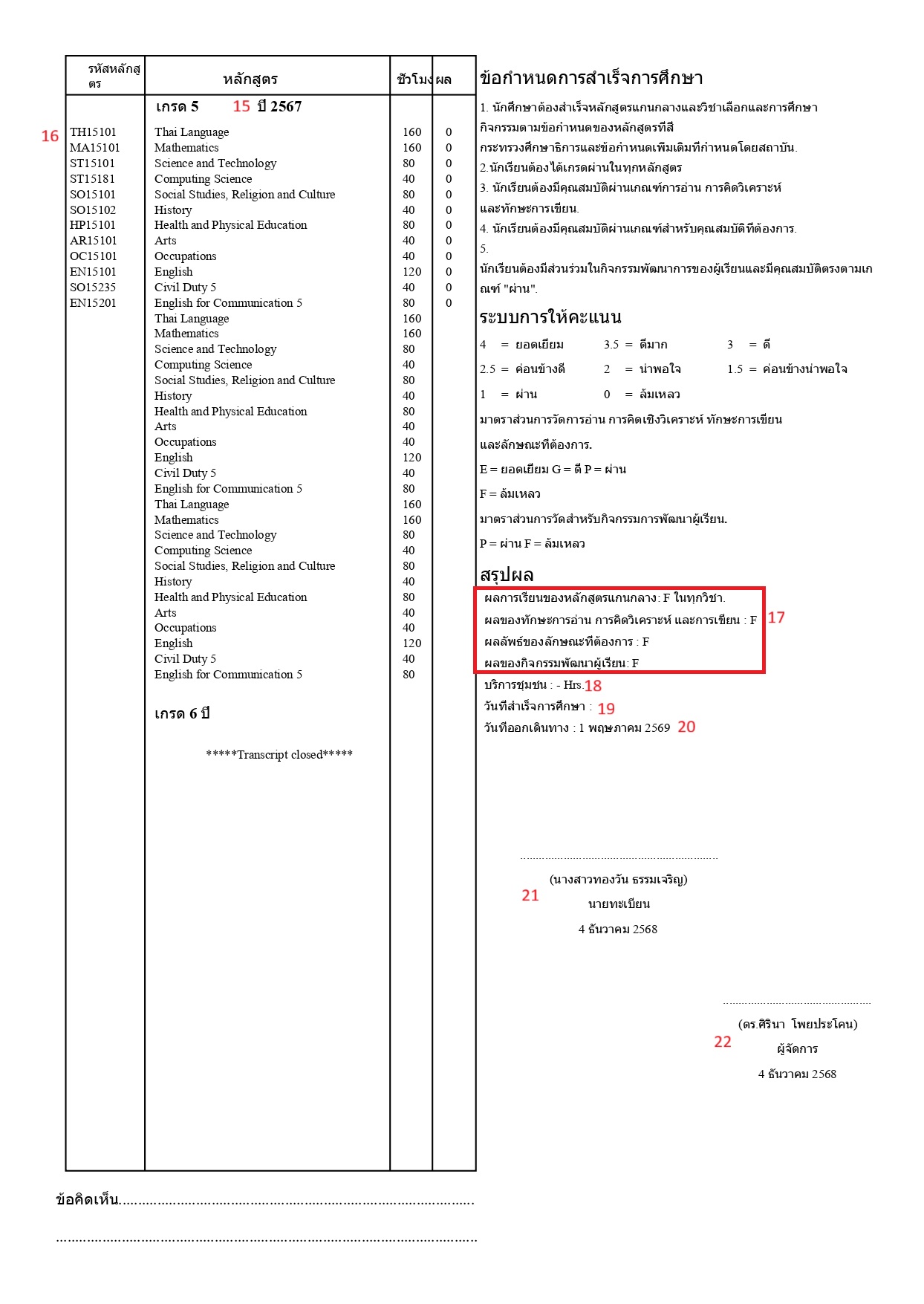
สรุปผล (Summary of Result)
-
Object Number: 6
-
Old Name: page-2_summaryresult
-
Object Name: page-2 summary result
-
PowerQuery: ผลการเรียนของหลักสูตรแกนกลาง:
~(*powerquery;query=com.powerschool.th.report.dat.overallgradegroupbygradelevel;arg.storecode=Y1;arg.gradelevel=6;arg.credittype=lda;arg.excludedcreditlist=d;fields=result)ในทุกวิชา.
ผลของทักษะการอ่าน การคิดวิเคราะห์ และการเขียน:~(*powerquery;query=com.powerschool.th.report.dat.overallgradegroupbygradelevel;arg.storecode=Y1;arg.gradelevel=6;arg.credittype=lda;arg.excludedcreditlist=d;fields=result)
ผลลัพธ์ของลักษณะที่ต้องการ:~(*powerquery;query=com.powerschool.th.report.dat.overallgradegroupbygradelevel;arg.storecode=Y1;arg.gradelevel=6;arg.credittype=lda;arg.excludedcreditlist=d;fields=result)
ผลของกิจกรรมพัฒนาผู้เรียน:~(*powerquery;query=com.powerschool.th.report.dat.overallgradegroupbygradelevel;arg.storecode=Y1;arg.gradelevel=6;arg.credittype=lda;arg.excludedcreditlist=d;fields=result) -
Screen: Historical Grades, Grade Scale
Description: This DAT is used to determine the grade achieved for a specific credit type of course at the single grade level, using the arguments storecode, gradelevel, credittype, and excludedcreditlist to retrieve the following field.
-
Result: Retrieves the grade data based on the provided arguments from the assigned grade scale.
The following arguments are used:
-
arg.storecode: Required argument indicating the store code. Example:
arg.storecode=Y1(This sets the store code to "Y1") -
arg.gradelevel: Required argument indicating the grade level. Example:
arg.gradelevel=8(This sets the grade level to 8) -
arg.credittype: Required argument specifying the credit type. Example:
arg.credittype=basic(This sets the credit type to "basic") -
arg.excludedcreditlist: Excludes the credit type that is not needed from the list. Example:
arg.excludedcreditlist=ld(This excludes the credit type "ld")
-
สรุปผล (Summary of Result)
-
Object Number: 6
-
Old Name: page-2_summaryresult
-
Object Name: page-2 summary result
-
PowerQuery: Community Service:
~(*powerquery;query=com.powerschool.th.report.dat.credithrsbygradelevel;arg.storecode=Y1;arg.gradelevel=6;arg.credittypelist=basic;fields=passedhours)Hrs. -
Screen: Historical Grades, Grade Scale
Description: This DAT is used to display the credit hours and credits based on the provided arguments: storecode, gradelevel, credittypelist, and coursenumberlist. The fields retrieved are:
-
enrolledcredits: The total number of credit hours (divided by 40) a student is currently registered for in a given store code.
-
passedcredits: The number of credit hours (divided by 40) a student has successfully completed and is registered for in a given store code.
-
passedhours: The total number of hours associated with the courses that a student has successfully completed and is registered for in a given store code.
-
enrolledhours: The total number of hours a student is currently registered for in a given store code.
-
สรุปผล (Summary of Result)
-
Object Number: 6
-
Old Name: page-2_summaryresult
-
Object Name: page-2 summary result
-
PowerQuery: ~(*powerquery;query=com.powerschool.th.report.dat.thaidateformat;arg.gregoriandate=~(*powerquery;query=com.powerschool.th.report.dat.graduationdetails;arg.gradelevel=6;arg.dateformat=DD-MON-YYYY;fields=graduationdate);fields=thaidate;)
-
Screen: Graduation Detail
Description: This DAT is used to display Graduation Date of the student against grade level given in the argument in Thai format.
The following arguments are used:
-
arg.gradelevel: Required argument indicating the grade level of the students. Example:
gradelevel=9(This sets the grade level to 9). -
arg.dateformat: Required argument indicating the date format. Example:
arg.dateformat=DD-MM-YYYY(This sets the date format to DD-MM-YYYY).
-
สรุปผล (Summary of Result)
-
Object Number: 6
-
Old Name: page-2_summaryresult
-
Object Name: page-2 summary result
-
PowerQuery: ~(*powerquery;query=com.powerschool.th.report.dat.thaidateformat;arg.gregoriandate=~(*powerquery;query=com.powerschool.th.report.dat.reenrollmentdetails;arg.gradelevel=6;fields=exitdate);fields=thaidate)
-
Screen: Reenrollment
Description: This DAT is used to display exit date of the student against grade level given in the argument in thai format.
-
arg.gradelevel: Required argument indicating the grade level of the students.
-
นายทะเบียน (Registrar)
-
Object Number: 12
-
Old Name: page2_registrar_labelpart
-
Object Name: page2 registrar
-
PowerQuery: (~([39]Registrar_name))
นายทะเบียน
~(*powerquery;query=com.powerschool.th.report.dat.thaidateformat;fields=thaidate;arg.gregoriandate=^(f.currentdate;dateformat=DD-MM-YYYY)) -
Screen: School info
Description: This DAT is used to display the registrar name of the school.
-
^[letter.date]is used to print the current date. It is passed as argument to the dat com.powerschool.th.report.dat.thaidateformat to get the date in thai format
-
ผู้จัดการ (Director)
-
Object Number: 7
-
Old Name: page2_director_labelpart
-
Object Name: page2 director
-
PowerQuery: (~([39]Principal))
-
Screen: School info
Description: This DAT is used to display the principal name of the school.