-
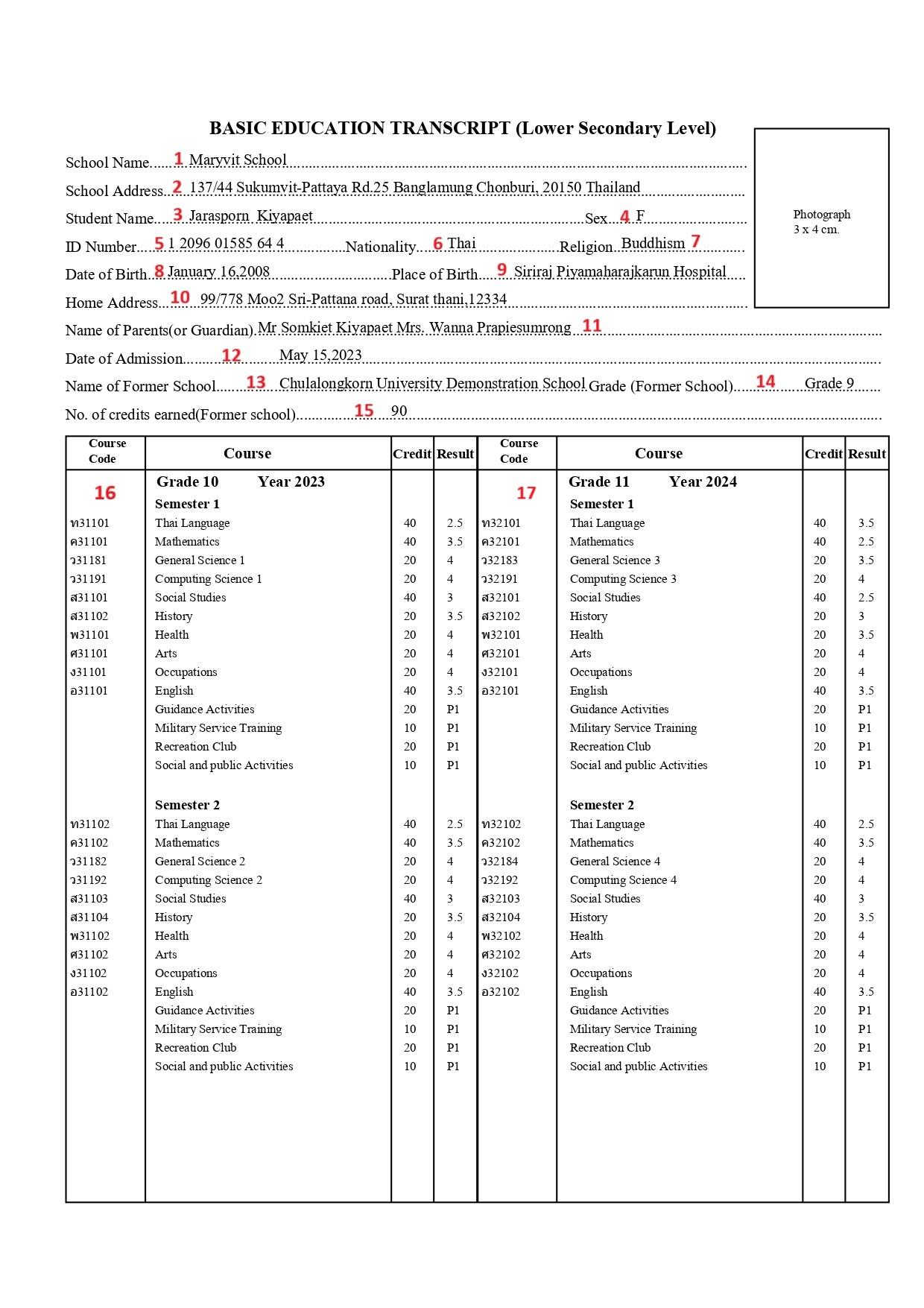
School Name
-
Old Name: school_value
-
Object Name: school name
-
PowerQuery: ~([schools.schoolscorefields]altschoolname)
-
Screen: School info
Description: This DAT displays the school name of the student. If the user needs to display the school name use the DAT ~([39]Name).
-
School Address
-
Old Name: schoolAddress_value
-
Object Name: school address
-
PowerQuery: ~([schools.s_tha_schools_x]alt_schl_address)
-
Screen: School info
Description: This DAT displays the alternate school address of the student. If the user needs to display the default school address use the DAT ~([39]address).
-
Student Name
-
Old Name: studentName_value
-
Object Name: student name
-
PowerQuery: ~(*powerquery;query=com.powerschool.th.dat.studentinfo;fields=altfirstname) ~(*powerquery;query=com.powerschool.th.dat.studentinfo;fields=altmiddlename) ~(*powerquery;query=com.powerschool.th.dat.studentinfo;fields=altlastname)
-
Screen: Student Demographics
Description: ~(*powerquery;query=com.powerschool.th.dat.studentinfo;fields=altfirstname) - This DAT displays the alternate first name of the student. Use ~(first_name) to get the default first name of the student.
~(*powerquery;query=com.powerschool.th.dat.studentinfo;fields=altmiddlename) - This DAT displays the alternate middle name of the student. Use ~(middle_name) to get the default middle name of the student.
~(*powerquery;query=com.powerschool.th.dat.studentinfo;fields=altlastname) - This DAT displays the alternate last name of the student. Use ~(last_name) to get the default last name of the student.
-
Student Gender
-
Old Name: gender_value
-
Object Name: student gender
-
PowerQuery: ~(gender)
-
Screen: Student Demographics
Description: This DAT displays the gender of the student.
-
Student ID Number
-
Old Name: nationalId_value
-
Object Name: student NationalID
-
PowerQuery:
~(*powerquery;query=com.powerschool.th.dat.studentinfo;fields=formatted_nationalid) -
Screen: Student Demographics
Description: This DAT is used to to present the student's national ID in the Thai format, which is X XXXX XXXXX XX X.
-
Student Nationality
-
Old Name: nationality_value
-
Object Name: student nationality
-
PowerQuery:
~(*powerquery;query=com.powerschool.th.dat.studentinfo;fields=nationality;arg.locale=US_th) -
Screen: Student Demographics
Description: This DAT displays the nationality of the student.
-
Student Religion
-
Old Name: religion_value
-
Object Name: student religion
-
PowerQuery:
~(*powerquery;query=com.powerschool.th.dat.studentinfo;fields=religion;arg.locale=US_th) -
Screen: Student Demographics
Description: This DAT displays the Religion of the student.
-
Student DOB
-
Old Name: dob_value
-
Object Name: student dob
-
PowerQuery: ^(decode;^(DOB;dateformat=DD/MM/YYYY);00/00/0000; ;~(*powerquery;query=com.powerschool.th.report.dat.thaidateformat;fields=thaidate;arg.gregoriandate=^(DOB;dateformat=DD/MM/YYYY)))
-
Screen: Student Demographics
Description: This DAT displays the DOB of the student in ‘MMMM d,yyyy’ format. Example: January 14,2004.
-
Student Place of Birth
-
Old Name: placeofbirth_value
-
Object Name: student placeofbirth
-
PowerQuery: ^(S_THA_STU_X.altPlaceOfBirth)
-
Screen: Student Demographics
Description: This DAT displays the alternate Place of Birth of the Student. Use the DAT ^(students.s_tha_stu_x.placeofbirth) to display the default place of birth.
-
Student Home Address
-
Old Name: homeaddress_value
-
Object Name: student homeaddress
-
PowerQuery: ^(S_THA_STU_X.althomeAddress)
-
Screen: Student Demographics
Description: This DAT displays the Home Address of the student.
-
Parents/Guardian Name
-
Old Name: parents_value
-
Object Name: parent/guardian name
-
PowerQuery:
~(*powerquery;query=com.powerschool.th.dat.studentinfo;fields=fathernameenglish)
~(*powerquery;query=com.powerschool.th.dat.studentinfo;fields=mothernameenglish) -
Screen: Contact Management
Description: This DAT displays the alternate father name and mother name of the student in the (Prefix, given name, middle name, surname) format. Use the DATs ~(*powerquery;query=com.powerschool.th.dat.studentinfo;fields=fathername) ~(*powerquery;query=com.powerschool.th.dat.studentinfo;fields=mothername) to get the default names insetad of alternate.
-
Date of Admission
-
Old Name: admissionDate_Value
-
Object Name: admission date
-
PowerQuery: ^(EntryDate;dateformat=MMMM d,yyyy)
-
Screen: Student Enrollment
Description: This DAT displays the admission date of the student in 'MMMM d,yyyy' format. Example: July 2,2024.
-
School Name(Former School)
-
Old Name: formerschool_value
-
Object Name: former school name
-
PowerQuery: ~(*powerquery;query=com.powerschool.th.report.dat.formerschooldetails;fields=altschoolname;arg.storecode=Y1)
-
Screen: Historical Grades
Description: This DAT displays the former school of the student.
-
Grade(Former School)
-
Old Name: formergrade_value
-
Object Name: former school grade
-
PowerQuery: ~(*powerquery;query=com.powerschool.th.report.dat.formerschooldetails;fields=gradelevel;arg.storecode=Y1)
-
Screen: Historical Grades
Description: This DAT displays the former grade in which the student was studying in the former school.
-
Credits Earned(Former School)
-
Old Name: formercredit_value
-
Object Name: former credit
-
PowerQuery: ~(*powerquery;query=com.powerschool.th.report.dat.formerschooldetails;fields=credit;arg.storecode=Y1)
-
Screen: Historical Grades
Description: This DAT displays the total credits the student earned at their previous school.
-
Grade 10(Semester 1 and Semester 2)
-
Old Name: grade10_table
-
Object Name: grade10 table
-
PowerQuery: This object contains a total of six PowerQuery DAT calls
Semester 1 (storecode = S1)
^(*powerquery;query=com.powerschool.th.report.dat.courseinfotable;tableformat;fields=alt_course_number,alt_course_name,earnedcrhrs,gpa_points;arg.storecode=S1;arg.gradelevel=10;arg.credittypelist=basic;arg.excludedcreditlist=basir;arg.locale=US_en)
^(*powerquery;query=com.powerschool.th.report.dat.courseinfotable;tableformat;fields=alt_course_number,alt_course_name,earnedcrhrs,grade;arg.storecode=S1;arg.gradelevel=10;arg.credittypelist=lda;arg.shownumber=n;arg.excludedcreditlist=ld;arg.locale=US_en)
^(*powerquery;query=com.powerschool.th.report.dat.courseinfotable;tableformat;fields=alt_course_number,alt_course_name,earnedcrhrs,grade;arg.storecode=S1;arg.gradelevel=10;arg.credittypelist=elec;arg.shownumber=n;arg.excludedcreditlist=el,ec;arg.locale=US_en)
Semester 2 (storecode = S2)
The same DATs are reused for Semester 2.
The only change is the storecode: arg.storecode=S2.^(*powerquery;query=com.powerschool.th.report.dat.courseinfotable;tableformat;fields=alt_course_number,alt_course_name,earnedcrhrs,gpa_points;arg.storecode=S2;arg.gradelevel=10;arg.credittypelist=basic;arg.excludedcreditlist=basir;arg.locale=US_en)
^(*powerquery;query=com.powerschool.th.report.dat.courseinfotable;tableformat;fields=alt_course_number,alt_course_name,earnedcrhrs,grade;arg.storecode=S2;arg.gradelevel=10;arg.credittypelist=lda;arg.shownumber=n;arg.excludedcreditlist=ld;arg.locale=US_en)
^(*powerquery;query=com.powerschool.th.report.dat.courseinfotable;tableformat;fields=alt_course_number,alt_course_name,earnedcrhrs,grade;arg.storecode=S2;arg.gradelevel=10;arg.credittypelist=elec;arg.shownumber=n;arg.excludedcreditlist=el,ec;arg.locale=US_en)
-
Screen: Course Info, Historical Grades
Description: This object uses multiple instances of the courseinfotable DAT to display academic records for Grade 10, covering both Semester 1 and Semester 2.
All DATs retrieve course-level data by using arguments such as storecode, gradelevel, credittypelist, excludedcreditlist, showgpa, shownumber, and showgrade.
These arguments determine which courses are included, how they are grouped, and which fields are displayed.
The DAT returns the following fields:
-
alt_course_number – Alternate course number
-
alt_course_name – Alternate course name
-
earnedcrhrs – Earned credit hours
-
grade – Final awarded grade (if shown)
DAT Arguments
-
arg.storecode (Required) – Specifies the storecode (e.g., S1 or S2).
-
Example:
arg.storecode=S1
-
-
arg.gradelevel (Required) – Specifies the student’s grade level.
-
Example:
arg.gradelevel=10
-
-
arg.credittypelist (Required) – Groups courses by credit type (basic, lda, elec).
-
Example:
arg.credittypelist=basic
-
-
arg.excludedcreditlist – Excludes specific credit types.
-
Example:
arg.excludedcreditlist=ld
-
-
arg.showgpa – Shows or hides GPA points.
-
Example:
arg.showgpa=y
-
-
arg.shownumber – Shows or hides the course number.
-
Example:
arg.shownumber=n
-
-
arg.showgrade – Shows or hides the grade.
-
Example:
arg.showgrade=y
-
Semester 1 & Semester 2 inside the same object
The same object includes queries for both semesters.
The only difference is:
-
Semester 1 →
arg.storecode=S1 -
Semester 2 →
arg.storecode=S2
All other arguments and field structures remain the same.
-
Grade 11(Semester 1 and Semester 2)
-
Old Name: grade11_table
-
Object Name: grade11 table
-
PowerQuery: This object contains a total of six PowerQuery DAT calls
Semester 1 (storecode = S1)
^(*powerquery;query=com.powerschool.th.report.dat.courseinfotable;tableformat;fields=alt_course_number,alt_course_name,earnedcrhrs,gpa_points;arg.storecode=S1;arg.gradelevel=11;arg.credittypelist=basic;arg.excludedcreditlist=basir;arg.locale=US_en)^(*powerquery;query=com.powerschool.th.report.dat.courseinfotable;tableformat;fields=alt_course_number,alt_course_name,earnedcrhrs,grade;arg.storecode=S1;arg.gradelevel=11;arg.credittypelist=lda;arg.shownumber=n;arg.excludedcreditlist=ld;arg.locale=US_en)
^(*powerquery;query=com.powerschool.th.report.dat.courseinfotable;tableformat;fields=alt_course_number,alt_course_name,earnedcrhrs,grade;arg.storecode=S1;arg.gradelevel=11;arg.credittypelist=elec;arg.shownumber=n;arg.excludedcreditlist=el,ec;arg.locale=US_en)
Semester 2 (storecode = S2)
The same DATs are reused for Semester 2.
The only change is the storecode: arg.storecode=S2.^(*powerquery;query=com.powerschool.th.report.dat.courseinfotable;tableformat;fields=alt_course_number,alt_course_name,earnedcrhrs,gpa_points;arg.storecode=S2;arg.gradelevel=11;arg.credittypelist=basic;arg.excludedcreditlist=basir;arg.locale=US_en)
^(*powerquery;query=com.powerschool.th.report.dat.courseinfotable;tableformat;fields=alt_course_number,alt_course_name,earnedcrhrs,grade;arg.storecode=S2;arg.gradelevel=11;arg.credittypelist=lda;arg.shownumber=n;arg.excludedcreditlist=ld;arg.locale=US_en)
^(*powerquery;query=com.powerschool.th.report.dat.courseinfotable;tableformat;fields=alt_course_number,alt_course_name,earnedcrhrs,grade;arg.storecode=S2;arg.gradelevel=11;arg.credittypelist=elec;arg.shownumber=n;arg.excludedcreditlist=el,ec;arg.locale=US_en)
-
Screen: Course Info, Historical Grades
Description: This object uses multiple instances of the courseinfotable DAT to display academic records for Grade 11, covering both Semester 1 and Semester 2.
(Same wording as Grade 10 — unchanged)
-
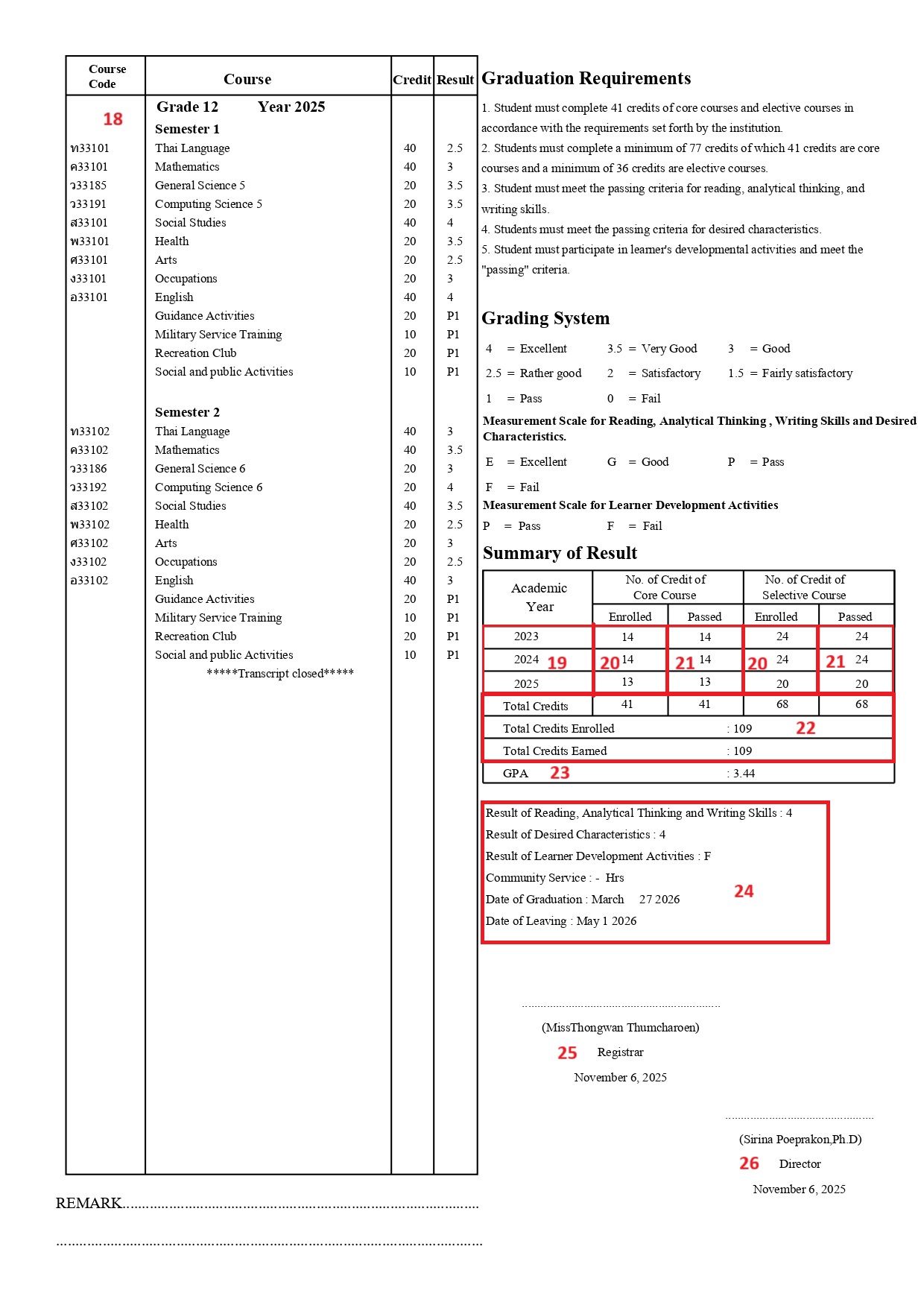
Grade 12(Semester 1 and Semester 2)
-
Old Name: grade12_table
-
Object Name: grade12 table
-
PowerQuery: This object contains a total of six PowerQuery DAT calls
Semester 1 (storecode = S1)
^(*powerquery;query=com.powerschool.th.report.dat.courseinfotable;tableformat;fields=alt_course_number,alt_course_name,earnedcrhrs,gpa_points;arg.storecode=S1;arg.gradelevel=12;arg.credittypelist=basic;arg.excludedcreditlist=basir;arg.locale=US_en)
^(*powerquery;query=com.powerschool.th.report.dat.courseinfotable;tableformat;fields=alt_course_number,alt_course_name,earnedcrhrs,grade;arg.storecode=S1;arg.gradelevel=12;arg.credittypelist=lda;arg.shownumber=n;arg.excludedcreditlist=ld;arg.locale=US_en)
^(*powerquery;query=com.powerschool.th.report.dat.courseinfotable;tableformat;fields=alt_course_number,alt_course_name,earnedcrhrs,grade;arg.storecode=S1;arg.gradelevel=12;arg.credittypelist=elec;arg.shownumber=n;arg.excludedcreditlist=el,ec;arg.locale=US_en)
Semester 2 (storecode = S2)
The same DATs are reused for Semester 2.
The only change is the storecode: arg.storecode=S2.^(*powerquery;query=com.powerschool.th.report.dat.courseinfotable;tableformat;fields=alt_course_number,alt_course_name,earnedcrhrs,gpa_points;arg.storecode=S2;arg.gradelevel=12;arg.credittypelist=basic;arg.excludedcreditlist=basir;arg.locale=US_en)
^(*powerquery;query=com.powerschool.th.report.dat.courseinfotable;tableformat;fields=alt_course_number,alt_course_name,earnedcrhrs,grade;arg.storecode=S2;arg.gradelevel=12;arg.credittypelist=lda;arg.shownumber=n;arg.excludedcreditlist=ld;arg.locale=US_en)
^(*powerquery;query=com.powerschool.th.report.dat.courseinfotable;tableformat;fields=alt_course_number,alt_course_name,earnedcrhrs,grade;arg.storecode=S2;arg.gradelevel=12;arg.credittypelist=elec;arg.shownumber=n;arg.excludedcreditlist=el,ec;arg.locale=US_en)
-
Screen: Course Info, Historical Grades
Description: This object uses multiple instances of the courseinfotable DAT to display academic records for Grade 12, covering both Semester 1 and Semester 2.
(Same wording as Grade 10 — unchanged)
-
Summary of Result - Academic Year
|
Old Name |
Object Name |
|---|---|
|
page2_year10_label |
page2 year 10 |
|
page2 year11_label |
page2 year 11 |
|
page2_year12_label |
page2 year 12 |
-
PowerQuery:
^(*powerquery;query=com.powerschool.th.report.dat.stuyearbygradelevel;fields=year;arg.storecode=Y1;arg.gradelevel=12)
^(*powerquery;query=com.powerschool.th.report.dat.stuyearbygradelevel;fields=year;arg.storecode=Y1;arg.gradelevel=11)^(*powerquery;query=com.powerschool.th.report.dat.stuyearbygradelevel;fields=year;arg.storecode=Y1;arg.gradelevel=10)
-
Screen: Historical Grades
Description: This DAT is used to to present the student's study year based on the arguments storecode and gradelevel, which will retrieve the following fields.
DAT Arguments:
-
arg.storecode: Required argument indicating the store code.
-
Example:
storecode=Y1(This sets the store code to "Y1") -
arg.gradelevel: Required argument indicating the grade level.
-
Example:
gradelevel=10(This sets the grade level to 10)
The DAT returns the following fields:
-
year: Retrieves the academic year based on the provided arguments.
-
Summary of Result - No.of Credits Enrolled (Core Course & Selective Course)
|
Old Name |
Object Name |
|---|---|
|
page2_enrolledbasicgrade10val |
page2 Core_Enrolled grade10 |
|
page2_enrolledbasicgrade11val |
page2 Core_Enrolled grade11 |
|
page2_enrolledbasicgrade12val |
page2 Core_Enrolled grade12 |
|
page2_selectiveenrolledvalue10 |
page2 SelectiveEnrolledGrade10 |
|
page2_selectiveenrolledvalue11 |
page2 SelectiveEnrolledGrade11 |
|
page2_selectiveenrolledvalue12 |
page2 SelectiveEnrolledGrade12 |
-
PowerQuery:
^(*powerquery;query=com.powerschool.th.report.dat.credithrsbygradelevel;fields=enrolledcredits;arg.storecode=Y1;arg.gradelevel=12;arg.credittypelist=basic)
^(*powerquery;query=com.powerschool.th.report.dat.credithrsbygradelevel;fields=enrolledcredits;arg.storecode=Y1;arg.gradelevel=12;arg.credittypelist=basic)^(*powerquery;query=com.powerschool.th.report.dat.credithrsbygradelevel;fields=enrolledcredits;arg.storecode=Y1;arg.gradelevel=12;arg.credittypelist=basic)
^(*powerquery;query=com.powerschool.th.report.dat.credithrsbygradelevel;fields=enrolledcredits;arg.storecode=Y1;arg.gradelevel=10;arg.credittypelist=lda,elec)
^(*powerquery;query=com.powerschool.th.report.dat.credithrsbygradelevel;fields=enrolledcredits;arg.storecode=Y1;arg.gradelevel=11;arg.credittypelist=lda,elec)
^(*powerquery;query=com.powerschool.th.report.dat.credithrsbygradelevel;fields=enrolledcredits;arg.storecode=Y1;arg.gradelevel=12;arg.credittypelist=lda,elec)
-
Screen: Historical Grades, Grade scale
Description: This DAT is used to retrieve the total number of credits enrolled by the student for Grade Levels 10, 11, and 12, including both Core courses (basic) and Selective courses (lda, elec).
The query filters the stored grades by:
-
storecode (Y1)
-
gradelevel (10/11/12)
-
credittypelist (basic, lda, elec)
and calculates the total enrolled credit hours from the courses table.
Only the enrolledcredits field is returned, representing the total credits the student attempted for that grade level across all selected credit types.
Based on the arguments storecode, gradelevel, and credittypelist, the DAT calculates the total enrolled credit hours for each grade level. It pulls data from the storedgrades table (grade-level and storecode filtering) and the courses table (credit hours and credit type filtering).
DAT Arguments:
arg.storecode:
Required argument specifying which store code to use.
Example: storecode=Y1
arg.gradelevel:
Required argument determining the student’s grade level.
Example: gradelevel=10
arg.credittypelist:
Optional argument used to filter by credit type.
Example: credittypelist=basic
The DAT returns the following field:
enrolledcredits:
Returns the total number of Core or Selective Course credits the student enrolled in for the selected grade level based on the arguments passed.
-
Summary of Result - No.of Credits Passed (Core Course & Selective Course)
|
Old Name |
Object Name |
|---|---|
|
page2_passedbasicgrade10value |
page2 Core_Passed grade10 |
|
page2_passedbasicgrade11value |
page2 Core_Passed grade11 |
|
page2_passedbasicgrade12value |
page2 Core_Passed grade12 |
|
page2_selectivepassedvalue10 |
page2 SelectivePassedGrade10 |
|
page2_selectivepassedvalue11 |
page2 SelectivePassedGrade11 |
|
page2_selectivepassedvalue12 |
page2 SelectivePassedGrade12 |
-
PowerQuery:
^(*powerquery;query=com.powerschool.th.report.dat.credithrsbygradelevel;fields=enrolledcredits;arg.storecode=Y1;arg.gradelevel=12;arg.credittypelist=basic)
^(*powerquery;query=com.powerschool.th.report.dat.credithrsbygradelevel;fields=enrolledcredits;arg.storecode=Y1;arg.gradelevel=12;arg.credittypelist=basic)^(*powerquery;query=com.powerschool.th.report.dat.credithrsbygradelevel;fields=enrolledcredits;arg.storecode=Y1;arg.gradelevel=12;arg.credittypelist=basic)
^(*powerquery;query=com.powerschool.th.report.dat.credithrsbygradelevel;fields=passedcredits;arg.storecode=Y1;arg.gradelevel=10;arg.credittypelist=lda,elec)
^(*powerquery;query=com.powerschool.th.report.dat.credithrsbygradelevel;fields=passedcredits;arg.storecode=Y1;arg.gradelevel=11;arg.credittypelist=lda,elec)
^(*powerquery;query=com.powerschool.th.report.dat.credithrsbygradelevel;fields=passedcredits;arg.storecode=Y1;arg.gradelevel=12;arg.credittypelist=lda,elec)
-
Screen: Historical Grades, Grade scale
Description: This DAT is used to retrieve the total number of credits passed by the student for Grade Levels 10, 11, and 12, covering both Core courses (basic) and Selective courses (lda, elec).
The query applies the same filtering—storecode, gradelevel, and credittypelist—but returns the passedcredits field, which calculates the total earned credit hours from the stored grades table.
This value represents the credits the student successfully completed within each grade level.
DAT Arguments:
-
arg.storecode: Required.
Example:storecode=Y1 -
arg.gradelevel: Required.
Example:gradelevel=10 -
arg.credittypelist: Optional filter for credit types.
Example:credittypelist=basic,lda,elec]
The DAT returns the following field:
passedcredits:
Total number of Core or Selective credits successfully passed for the selected grade level.
-
Summary of Result -Total Credits Enrolled & Passed (Core Course & Selective Course)
|
Old Name |
Object Name |
|---|---|
|
page2_basicenrolledtotvalue |
page2 TotalCoreCreditsEnrolled |
|
page2_basicpassedtotvalue |
page2 TotalCoreCreditsPassed |
|
page2_selectivenrolledtotvalue |
page2 TotalSelectiveEnrolled |
|
page2_selectivepassedtotvalue |
page2 TotalSelectivePassed |
|
page2_totearnedcreditscolon |
page2 TotalCreditsEarned |
|
page2_totenrolledcreditscolon |
page2 TotalCreditEnrolled |
-
PowerQuery:
^(*powerquery;query=com.powerschool.th.report.dat.credithrsbymultiplegradelevels;fields=enrolledcredits;arg.storecode=Y1;arg.mingradelevel=10;arg.maxgradelevel=12;arg.credittypelist=basic)^(*powerquery;query=com.powerschool.th.report.dat.credithrsbymultiplegradelevels;fields=passedcredits;arg.storecode=Y1;arg.mingradelevel=10;arg.maxgradelevel=12;arg.credittypelist=basic)
^(*powerquery;query=com.powerschool.th.report.dat.credithrsbymultiplegradelevels;fields=enrolledcredits;arg.storecode=Y1;arg.mingradelevel=10;arg.maxgradelevel=12;arg.credittypelist=lda,elec)
^(*powerquery;query=com.powerschool.th.report.dat.credithrsbymultiplegradelevels;fields=passedcredits;arg.storecode=Y1;arg.mingradelevel=10;arg.maxgradelevel=12;arg.credittypelist=lda,elec)
^(*powerquery;query=com.powerschool.th.report.dat.credithrsbymultiplegradelevels;fields=enrolledcredits;arg.storecode=Y1;arg.mingradelevel=10;arg.maxgradelevel=12;arg.credittypelist=basic,lda,elec)
^(*powerquery;query=com.powerschool.th.report.dat.credithrsbymultiplegradelevels;fields=passedcredits;arg.storecode=Y1;arg.mingradelevel=10;arg.maxgradelevel=12;arg.credittypelist=basic,lda,elec)
-
Screen: Historical Grades, Grade scale
Description: This DAT calculates the total credits a student has enrolled in and passed across multiple grade levels. It supports retrieval for:
-
Core Courses (
basic) -
Selective Courses (
lda, elec) -
Both Core and Selective Courses combined (
basic, lda, elec)
Instead of retrieving credits grade-by-grade, this DAT summarizes the totals across a range of grade levels using the arguments mingradelevel and maxgradelevel.
It pulls data from the following tables:
-
storedgrades— earned credit hours, grade levels, store codes -
courses— credit hours, credit type -
students— student identification
DAT Arguments:
-
arg.storecode:
Specifies the store code used for selecting historical grades.
Example:storecode=Y1 -
arg.mingradelevel
Lower boundary of the grade level range.
Example:mingradelevel=10 -
arg.maxgradelevel
Upper boundary of the grade level range.
Example:maxgradelevel=12 -
arg.credittypelist
Filters the credits by credit type.
Can be:basicfor Core,lda, elecfor Selective, orbasic, lda, elecfor both
The DAT returns the following field:
enrolledcredits
Total number of credits attempted (enrolled) in the selected grade level range and credit type(s).
passedcredits
Total number of credits successfully earned (passed) in the selected grade level range and credit type(s).
23. Summary of Result -GPA
-
Old Name: page2_gpacolonlabel
-
Object Name: page2 gpa
-
PowerQuery:
: ~(*powerquery;query=com.powerschool.th.report.dat.totalcreditweightedavg;arg.storecode=Y1;arg.mingradelevel=10;arg.maxgradelevel=12;arg.credittypelist=basic;fields=avg_weighted_credit) -
Screen: Course info, Historical Grades
Description: This DAT displays the Average Weighted GPA for the student across the specified grade range (Grades 10 to 12).
This calculation considers only the courses that fall within the given store code, grade boundaries, and optional credit type filters (core, selective, or basic).
Weighted GPA is computed based on the GPA points earned for each course, with weighting applied depending on the course level or type.
DAT Arguments:
-
arg.storecode:
Specifies the store code used for selecting historical grades.
Example:storecode=Y1 -
arg.mingradelevel
Lower boundary of the grade level range.
Example:mingradelevel=10 -
arg.maxgradelevel
Upper boundary of the grade level range.
Example:maxgradelevel=12 -
arg.credittypelist
Filters the credits by credit type.
Can be:basicfor Core,lda, elecfor Selective, orbasic, lda, elecfor both
-
Summary of Result -Student Additional Results
-
Old Name: page-2_summaryresultlabel
-
Object Name: page-2 Additional Result
-
PowerQueries Used:
-
Result of Reading, Analytical Thinking and Writing Skills
~(*powerquery;query=com.powerschool.th.report.dat.overallgradegroupbymultiplegradelevels;arg.storecode=Y1;arg.mingradelevel=10;arg.maxgradelevel=12;arg.excludedcreditlist=el,ec;arg.credittypelist=elec;fields=result)
Screen: Historical Grades, Grade Scale -
Result of Desired Characteristics
~(*powerquery;query=com.powerschool.th.report.dat.overallgradegroupbymultiplegradelevels;arg.storecode=Y1;arg.mingradelevel=10;arg.maxgradelevel=12;arg.excludedcreditlist=el,ec;arg.credittypelist=elec;fields=result)
Screen: Historical Grades, Grade Scale -
Result of Learner Development Activities
~(*powerquery;query=com.powerschool.th.report.dat.overallgradegroupbymultiplegradelevels;arg.storecode=Y1;arg.mingradelevel=10;arg.maxgradelevel=12;arg.excludedcreditlist=el,ec;arg.credittypelist=lda;fields=result)
Screen: Historical Grades, Grade Scale -
Community Service Hours
^(*powerquery;query=com.powerschool.th.report.dat.credithrsbymultiplegradelevels;fields=passedhours;arg.storecode=Y1;arg.mingradelevel=10;arg.maxgradelevel=12;arg.coursenumberlist=ASTRO1234)
Screen: Historical Grades, Grade Scale -
Date of Graduation
~(*powerquery;query=com.powerschool.th.report.dat.graduationdetails;arg.gradelevel=12;fields=graduationdate;arg.dateformat=MONTH DD YYYY)
Screen: Graduation Detail -
Date of Leaving
~(*powerquery;query=com.powerschool.th.report.dat.reenrollmentdetails;arg.gradelevel=12;fields=exitdate;arg.dateformat=MONTH DD YYYY)
Screen: Re-enrollment
-
Description: This object displays a set of student academic and co-curricular results collected from multiple PowerQueries that evaluate performance across grade levels.
Result of Reading, Analytical Thinking and Writing Skills / Desired Characteristics / Learner Development Activities
These fields display the overall result score for the selected category by aggregating course performance from Grades 10 to 12.
The query filters values based on the given storecode, includes only the specified credittypelist (such as elec or lda), and excludes credit types listed in excludedcreditlist (el, ec).
Only the final result value is returned.
arg.storecode = Y1 – Uses Year 1 final grades.
arg.mingradelevel = 10 / arg.maxgradelevel = 12 – Filters data from Grades 10–12.
arg.credittypelist = elec / lda – Limits the category being evaluated.
arg.excludedcreditlist = el, ec – Removes specified credit types from the calculation.
fields = result – Returns only the aggregated category result.
Community Service Hours
This DAT displays the total passed community service hours completed by the student within Grades 10 to 12, based on a specific course number list.
arg.storecode = Y1 – Uses Year 1 final grades.
arg.mingradelevel = 10 / arg.maxgradelevel = 12 – Filters data from Grades 10–12.
arg.coursenumberlist = ASTRO1234 – Filters only community service courses.
fields = passedhours
Date of Graduation
This DAT displays the student’s graduation date for Grade 12 in the format MONTH DD YYYY.
arg.gradelevel: Required argument indicating the grade level of the students. Example: gradelevel=10 (This sets the grade level to 10)
arg.dateformat: Required argument indicating the date format. Example: arg.dateformat=DD-MM-YYYY (This sets the date formate to DD-MM-YYYY)
Date of Leaving
This DAT displays the exit/withdrawal date for the student when leaving the school in Grade 12, formatted as MONTH DD YYYY.
arg.gradelevel: Required argument indicating the grade level of the students. Example: gradelevel=10 (This sets the grade level to 10)
arg.dateformat: Required argument indicating the date format. Example: arg.dateformat=DD-MM-YYYY (This sets the date formate to DD-MM-YYYY)
-
Registrar
-
Old Name: page2_registrar_labelpart
-
Object Name: page2 registrar
-
PowerQuery: (~([schools.schoolscorefields]altregistrarname))
Registrar
^[letter.date] -
Screen: School info
Description: This DAT is used to to display the alternate registrar name of the school.
-
^[letter.date]is used to print the current date.
-
Director
-
Old Name: page2_director_labelpart
-
Object Name: page2 director
-
PowerQuery: (~([schools.schoolscorefields]altPrincipal))
Director
^[letter.date] -
Screen: School info
Description: This DAT is used to to display the alternate principal name of the school.
-
^[letter.date]is used to print the current date.