-
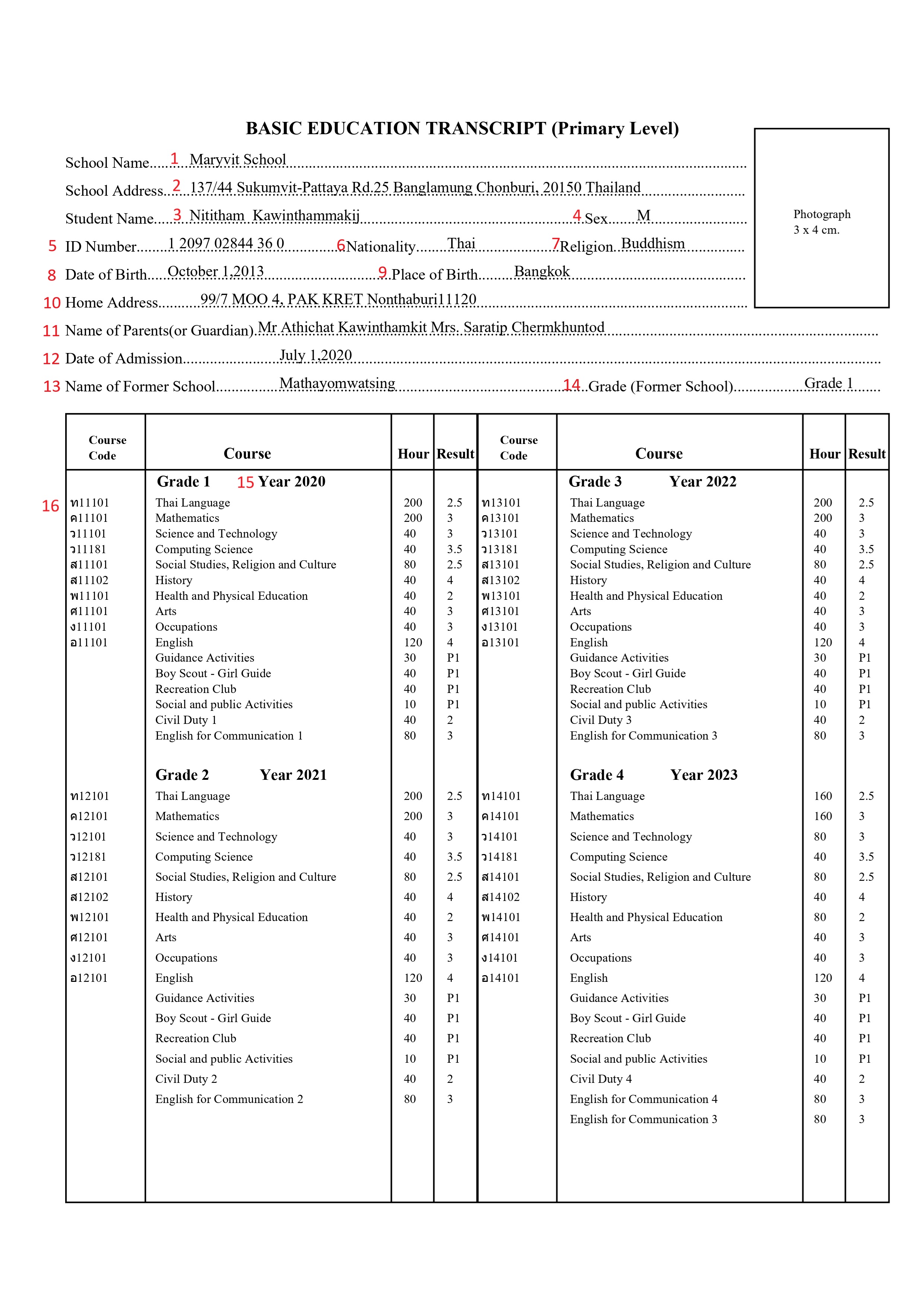
School Name
-
Object Number: 45
-
Old Name: school_value
-
Object Name: school name
-
PowerQuery: ~([schools.schoolscorefields]altschoolname)
-
Screen: School info
Description: This DAT is used to display the alternate school name of the student. If the user needs to display the default school name use the DAT ~([39]Name).
-
School Address
-
Object Number: 44
-
Old Name: schoolAddress_value
-
Object Name: school address
-
PowerQuery: ~([schools.s_tha_schools_x]alt_schl_address)
-
Screen: School info
Description: This DAT is used to display the alternate school address of the student. If the user needs to display the default school address use the DAT ~([39]address).
-
Student Name
-
Object Number: 49
-
Old Name: studentName_value
-
Object Name: student name
-
PowerQuery: ~(*powerquery;query=com.powerschool.th.dat.studentinfo;fields=altfirstname) ~(*powerquery;query=com.powerschool.th.dat.studentinfo;fields=altmiddlename) ~(*powerquery;query=com.powerschool.th.dat.studentinfo;fields=altlastname)
-
Screen: Student Demographics
Description:
~(*powerquery;query=com.powerschool.th.dat.studentinfo;fields=altfirstname) - This DAT is used to display the alternate first name of the student. Use ~(first_name) to get the default first name of the student.
~(*powerquery;query=com.powerschool.th.dat.studentinfo;fields=altmiddlename) - This DAT is used to display the alternate middle name of the student. Use ~(middle_name) to get the default middle name of the student.
~(*powerquery;query=com.powerschool.th.dat.studentinfo;fields=altlastname) - This DAT is used to display the alternate last name of the student. Use ~(last_name) to get the default last name of the student.
-
Sex
-
Object Number: 48
-
Old Name: gender_value
-
Object Name: Sex
-
PowerQuery: ~(gender)
-
Screen: Student Demographics
Description: This DAT is used to display the gender of the student.
-
ID Number
-
Object Number: 37
-
Old Name: nationalId_value
-
Object Name: National ID
-
PowerQuery: ~(*powerquery;query=com.powerschool.th.dat.studentinfo;fields=formatted_nationalid)
-
Screen: Student Demographics
Description: This DAT is used to present the student's national ID in the Thai format, which is X XXXX XXXXX XX X.
-
Nationality
-
Object Number: 38
-
Old Name: nationality_value
-
Object Name: Nationality
-
PowerQuery: ~(*powerquery;query=com.powerschool.th.dat.studentinfo;fields=nationality;arg.locale=US_en)
-
Screen: Student Demographics
Description: This DAT is used to display the nationality of the student.
-
Religion
-
Object Number: 43
-
Old Name: religion_value
-
Object Name: Religion
-
PowerQuery: ~(*powerquery;query=com.powerschool.th.dat.studentinfo;fields=religion;arg.locale=US_en)
-
Screen: Student Demographics
Description: This DAT is used to display the Religion of the student.
-
Date of Birth
-
Object Number: 24
-
Old Name: dob_value
-
Object Name: Date of Birth
-
PowerQuery: ~(dob;dateformat=MMMM d,yyyy)
-
Screen: Student Demographics
Description: This DAT is used to display the DOB of the student in MMMM d,yyyy format. Example: January 14,2004.
-
Place of Birth
-
Object Number: 42
-
Old Name: placeofbirth_value
-
Object Name: Place of Birth
-
PowerQuery: ^(S_THA_STU_X.altPlaceOfBirth)
-
Screen: Student Demographics
Description: This DAT is used to display the alternate Place of Birth of the Student. Use the DAT ^(S_THA_STU_X.PlaceOfBirth) to display the default place of birth.
-
Home Address
-
Object Number: 33
-
Old Name: homeaddress_value
-
Object Name: Home Address
-
PowerQuery: ^(S_THA_STU_X.althomeAddress)
-
Screen: General Demographics
Description: This DAT is used to display the Home Address of the student.
-
Name of Parents(or Guardian)
-
Object Number: 40
-
Old Name: parents_value
-
Object Name: Parents Name
-
PowerQuery: ~(*powerquery;query=com.powerschool.th.dat.studentinfo;fields=fathernameenglish) ~(*powerquery;query=com.powerschool.th.dat.studentinfo;fields=mothernameenglish)
-
Screen: Contact Management
Description: This DAT is used to display the alternate father name and mother name of the student in the (Prefix, given name, middle name, surname) format. Use the DATs ~(*powerquery;query=com.powerschool.th.dat.studentinfo;fields=fathername) ~(*powerquery;query=com.powerschool.th.dat.studentinfo;fields=mothername) to get the default names instead of alternate.
-
Date of Admission
-
Object Number: 23
-
Old Name: admissionDate_Value
-
Object Name: Date of Admission
-
PowerQuery: ^(EntryDate;dateformat=MMMM d,yyyy)
-
Screen: Student Enrollment
Description: This DAT is used to display the admission date of the student in MMMM d,yyyy format. Example: July 2,2024.
-
Name of Former School
-
Object Number: 36
-
Old Name: formerschool_value
-
Object Name: Name of Former School
-
PowerQuery: ~(*powerquery;query=com.powerschool.th.report.dat.formerschooldetails;fields=altschoolname;arg.storecode=Y1)
-
Screen: Historical Grades
Description: This DAT is used to display the former school of the student.
-
Grade (Former School)
-
Object Number: 27
-
Old Name: formergrade_value
-
Object Name: Grade (Former School)
-
PowerQuery: ~(*powerquery;query=com.powerschool.th.report.dat.formerschooldetails;fields=gradelevel;arg.storecode=Y1)
-
Screen: Historical Grades
Description: This DAT is used to display the former grade in which the student was studying in the former school.
-
Year
-
Object Number: 51
-
Old Name: year1_text
-
Object Name: Year Grade 1
-
PowerQuery: ~(*powerquery;query=com.powerschool.th.report.dat.stuyearbygradelevel;fields=year;arg.storecode=Y1;arg.gradelevel=1)
-
Screen: Historical Grades
Description: This DAT is used to present the student's study year based on the arguments storecode and gradelevel, which will retrieve the following fields.
-
thaiyear: Retrieves the Thai academic year based on the provided arguments.
-
year: Retrieves the academic year based on the provided arguments.
-
Grade 1
-
Object Number: 28
-
Old Name: grade1_table
-
Object Name: Grade 1&2 table
-
PowerQuery:
^(*powerquery;query=com.powerschool.th.report.dat.courseinfotable;tableformat;fields=alt_course_number,alt_course_name,earnedcrhrs,gpa_points;arg.storecode=Y1;arg.gradelevel=1;arg.credittypelist=basic;arg.excludedcreditlist=basir;arg.locale=US_en)
^(*powerquery;query=com.powerschool.th.report.dat.courseinfotable;tableformat;fields=alt_course_number,alt_course_name,earnedcrhrs,grade;arg.storecode=Y1;arg.gradelevel=1;arg.credittypelist=lda;arg.shownumber=n;arg.excludedcreditlist=ld;arg.locale=US_en)
^(*powerquery;query=com.powerschool.th.report.dat.courseinfotable;tableformat;fields=alt_course_number,alt_course_name,earnedcrhrs,grade;arg.storecode=Y1;arg.gradelevel=1;arg.credittypelist=elec;arg.shownumber=n;arg.excludedcreditlist=el,ec;arg.locale=US_en)
-
Screen: Course info, Historical Grades
Description: This DAT is used to present the course information with the arguments storecode, gradelevel, credittype, excludedcreditlist, showgpa, shownumber, and showgrade. These arguments will retrieve the following fields:
-
course_number: This field retrieves the course number based on the arguments.
-
alt_course_number: This field retrieves the alternative course number based on the arguments.
-
course_name: This field retrieves the name of the course.
-
alt_course_name: This field retrieves the alternative name of the course.
-
earnedcrhrs: This field retrieves the earned credit hours for the course.
-
gpa_points: This field retrieves the GPA points associated with the course.
-
credits: This field retrieves the credits earned for the course.
-
grade: This field retrieves the grade received for the course.
The DAT takes the following arguments:
-
arg.storecode: Required argument indicating the storecode of the student.
-
Example: arg.storecode=Q1 (This sets the store code to "Q1")
-
arg.gradelevel: Required argument indicating the gradelevel of the student .
-
Example: arg.gradelevel=1 (This sets the grade level to 1)
-
arg.credittype: Required argument Specifying the credit type to group the course based on the credit type.
-
Example: arg.credittype=basic (This sets the credit type to basic we use like elec,lda)
-
arg.excludedcreditlist: Excludes the credit type that is not needed from the list.
-
Example: arg.excludedcreditlist=ld (This excludes the credit type "ld")
-
arg.showgpa: Specifies whether the GPA should be displayed.
-
Example: arg.showgpa=y (This will display the GPA) and arg.showgpa=n (This will not display the GPA)
-
arg.shownumber: Specifies whether the course number should be displayed.
-
Example: arg.shownumber=y (This will display the course number)
-
arg.showgrade: Specifies whether the grade should be displayed.
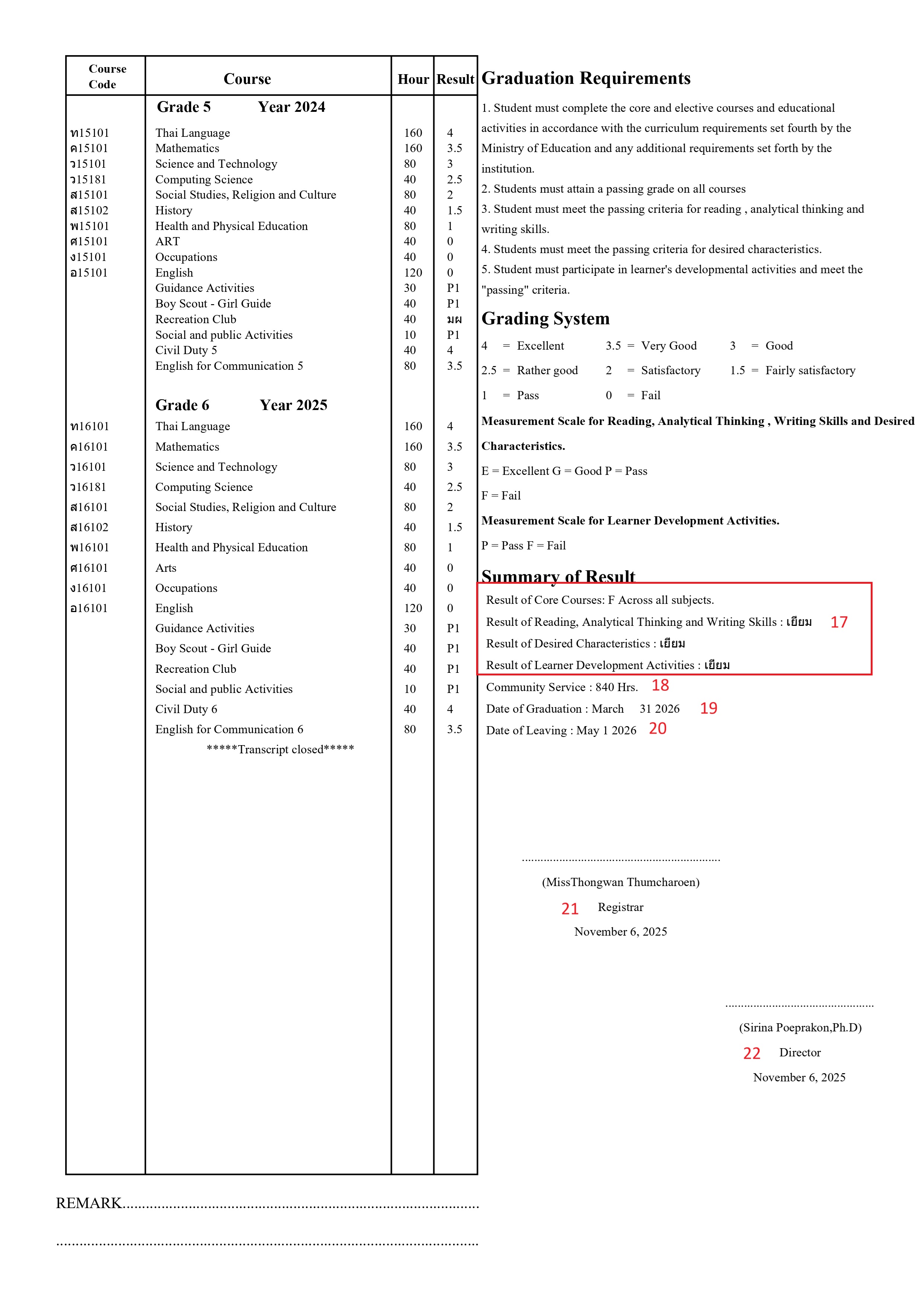
Same set of DATS are used below the DATs of grade level 1 to represent the academic records of grade level 2, with only the arg.gradelevel=2 being changed from 1.
-
Summary of Result
-
Object Number: 7
-
Old Name: page-2_summaryresult
-
Object Name: page-2 summary result
-
PowerQuery: Result of Core Courses:
~(*powerquery;query=com.powerschool.th.report.dat.overallgradegroupbygradelevel;arg.storecode=Y1;arg.gradelevel=6;arg.credittypelist=basic;arg.excludedcreditlist=d;fields=result)Across all subjects.
Result of Reading, Analytical Thinking and Writing Skills:~(*powerquery;query=com.powerschool.th.report.dat.overallgradegroupbygradelevel;arg.storecode=Y1;arg.gradelevel=6;arg.credittypelist=lda;arg.excludedcreditlist=d;fields=result)
Result of Desired Characteristics:~(*powerquery;query=com.powerschool.th.report.dat.overallgradegroupbygradelevel;arg.storecode=Y1;arg.gradelevel=6;arg.credittypelist=lda;arg.excludedcreditlist=d;fields=result)
Result of Learner Development Activities:~(*powerquery;query=com.powerschool.th.report.dat.overallgradegroupbygradelevel;arg.storecode=Y1;arg.gradelevel=6;arg.credittypelist=lda;arg.excludedcreditlist=d;fields=result) -
Screen: Historical Grades, Grade Scale
Description: This DAT is used to determine the grade achieved for a specific credit type of course at the single grade level, using the arguments storecode, gradelevel, credittype, and excludedcreditlist to retrieve the following field.
-
Result: Retrieves the grade data based on the provided arguments from the assigned grade scale.
The following arguments are used:
-
arg.storecode: Required argument indicating the store code. Example:
arg.storecode=Y1(This sets the store code to "Y1") -
arg.gradelevel: Required argument indicating the grade level. Example:
arg.gradelevel=8(This sets the grade level to 8) -
arg.credittype: Required argument specifying the credit type. Example:
arg.credittype=basic(This sets the credit type to "basic") -
arg.excludedcreditlist: Excludes the credit type that is not needed from the list. Example:
arg.excludedcreditlist=ld(This excludes the credit type "ld")
-
Summary of Result
-
Object Number: 7
-
Old Name: page-2_summaryresult
-
Object Name: page-2 summary result
-
PowerQuery: Community Service:
~(*powerquery;query=com.powerschool.th.report.dat.credithrsbygradelevel;arg.storecode=Y1;arg.gradelevel=6;arg.credittypelist=basic;fields=passedhours)Hrs. -
Screen: Historical Grades, Grade Scale
Description: This DAT is used to display the credit hours and credits based on the provided arguments: storecode, gradelevel, credittypelist, and coursenumberlist. The fields retrieved are:
-
enrolledcredits: The total number of credit hours (divided by 40) a student is currently registered for in a given store code.
-
passedcredits: The number of credit hours (divided by 40) a student has successfully completed and is registered for in a given store code.
-
passedhours: The total number of hours associated with the courses that a student has successfully completed and is registered for in a given store code.
-
enrolledhours: The total number of hours a student is currently registered for in a given store code.
-
Summary of Result
-
Object Number: 7
-
Old Name: page-2_summaryresult
-
Object Name: page-2 summary result
-
PowerQuery: Date of Graduation:
~(*powerquery;query=com.powerschool.th.report.dat.graduationdetails;arg.gradelevel=6;fields=graduationdate;arg.dateformat=MONTH DD YYYY) -
Screen: Graduation Detail
Description: This DAT is used to display Graduation Date of the student against grade level given in the argument
The following arguments are used:
-
arg.gradelevel: Required argument indicating the grade level of the students. Example:
gradelevel=9(This sets the grade level to 9) -
arg.dateformat: Required argument indicating the date format. Example:
arg.dateformat=DD-MM-YYYY(This sets the date format to DD-MM-YYYY)
-
Summary of Result
-
Object Number: 7
-
Old Name: page-2_summaryresult
-
Object Name: page-2 summary result
-
PowerQuery: Date of Leaving: ~(*powerquery;query=com.powerschool.th.report.dat.reenrollmentdetails;arg.gradelevel=6;fields=exitdate;arg.dateformat=MONTH DD YYYY)
-
Screen: Reenrollment
Description: This DAT is used to display exit date of the student against grade level given in the argument.
-
arg.gradelevel: Required argument indicating the grade level of the students.
-
Registrar
-
Object Number: 13
-
Old Name: page2_registrar_labelpart
-
Object Name: page2 registrar
-
PowerQuery: (~([schools.schoolscorefields]altregistrarname))
Registrar
^[letter.date] -
Screen: School info
Description: This DAT is used to display the alternate registrar name of the school.
-
^[letter.date]is used to print the current date.
-
Director
-
Object Number: 8
-
Old Name: page2_director_labelpart
-
Object Name: page2 director
-
PowerQuery: ~([schools.schoolscorefields]altPrincipal)
-
Screen: School info
Description: This DAT is used to display the alternate principal name of the school.